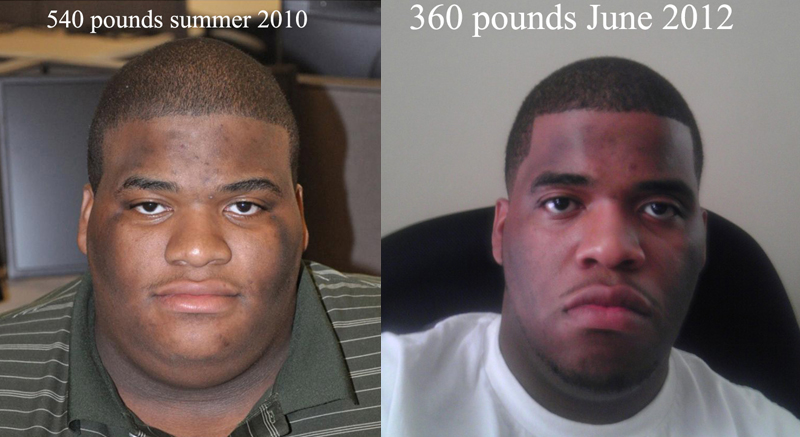
progress Share https://www.bariatricpal.com/gallery/image/56153-progress/ Share via email Share on Facebook Share on X Share on Reddit More sharing options... Followers 540 pounds summer 2010 . 490 pounds surgery day November 2011. 360 pounds June 2012. Hopefully this inspires people that need to lose 150+ pounds. it is possible and i am living proof. stay strong and stay positive everyone.
Thyckness718 LAP-BAND Patients June 17, 201214 yr Author stats Congratulations, and keep up the good work.
EcuaTrucho LAP-BAND Patients June 22, 201214 yr Author stats Wow, you have definetly inspired me. My start weight was 539 lbs. my current is 509 lbs. im pre-op and have my surgery July 25th 2012. Keep up the good work
Downtown Pony LAP-BAND Patients July 18, 201214 yr Author stats Beast. You would be there at 265. Get it Man!!
okstate2000 Gastric Sleeve Patients October 21, 201213 yr Author stats You are looking good man. Keep up the good work.
KRB829 Gastric Sleeve Patients December 13, 201213 yr Author stats Wow! you look amazing:) and I know you have to feel great!!!!!!!!!!!!!! And yes this does inspire me to stay on track. I was sleeved 3 months ago, and I am down 92 lbs. so far. Keep up the good work, and stay encouraged!!
charliesangelnumber2 Gastric Sleeve Patients December 17, 201213 yr Author stats What an accomplishment. Keep striving.
smt216 Gastric Sleeve Patients January 2, 201313 yr Author stats You look great! And it's nice to see all the hope out for all of us
frumpynomore Gastric Sleeve Patients January 31, 201313 yr Author stats CONGRATULATIONS!!!!!! You are such an inspiration! Wow! What a handsome young man!
A Healthy Mead Gastric Sleeve Patients April 20, 201313 yr Author stats Wow!!! Congratulations! You are very inspiring. You look great!
RitaB Gastric Sleeve Patients August 5, 201313 yr Author stats Amazing.....I want to see a smile in your next pic...you have a lot to be happy about.











Recommended Comments
Join the conversation
You can post now and register later. If you have an account, sign in now to post with your account.