Skip to content
View in the app

A better way to browse. Learn more.

BariatricPal

A full-screen app on your home screen with push notifications, badges and more.

To install this app on iOS and iPadOS
  1. Tap the Share icon in Safari
  2. Scroll the menu and tap Add to Home Screen.
  3. Tap Add in the top-right corner.
To install this app on Android
  1. Tap the 3-dot menu (⋮) in the top-right corner of the browser.
  2. Tap Add to Home screen or Install app.
  3. Confirm by tapping Install.
  • Cart

? One year revision - Band to Sleeve

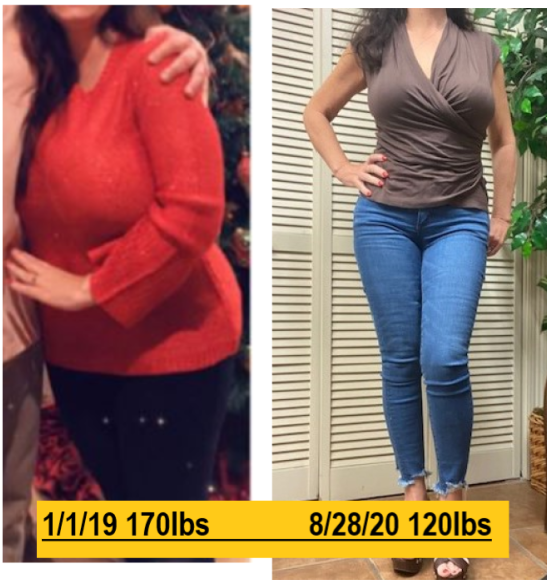
Today is my one-year revision sleeve-iversary..... So happy I chose to do this.

Banded 2009 @232lbs. size 18-20 down to 143 size 6, ER band removal 2017 @143lbs (slip due to stomach virus).

Sleeved 8/28/19 @173lbs size 10ish, today 120lbs size 0

image.png.d38c6cc483f09cc81e2565f2ef4b8c11.png

  • Replies 3
  • Views 1.9k
  • Created
  • Last Reply

Top Posters In This Topic

Most Popular Posts

Posted Images

Featured Replies

Hello Bayou Girl, I would like to first say I am happy for you! I recently had a sleeve from a band on 9/24/20 due to a slippage as well. My weight at the time was 186lbs and as of today too afraid to get on the scale. But my main questions to you are 1. How much do you eat? 2. How soon after you left the hospital did you start soft foods? 3. Did you do anything extra to get down to 120 besides following the diet?
  • 4 months later...
  • Author
On 10/7/2020 at 12:09 PM, ErickaMOM said:

The following picture was taken of me on Sunday 10/04/20

image-0.0010728836059570312.jpg

WOW!!!! i'm just seeing this..... holy HOT. You look amazing.

Join the conversation

You can post now and register later. If you have an account, sign in now to post with your account.

Guest
Reply to this topic...

Trending Products

PatchAid Vitamin Patches

Account

Navigation

Search

Search

Configure browser push notifications

Chrome (Android)
  1. Tap the lock icon next to the address bar.
  2. Tap Permissions → Notifications.
  3. Adjust your preference.
Chrome (Desktop)
  1. Click the padlock icon in the address bar.
  2. Select Site settings.
  3. Find Notifications and adjust your preference.