Skip to content
View in the app

A better way to browse. Learn more.

BariatricPal

A full-screen app on your home screen with push notifications, badges and more.

To install this app on iOS and iPadOS
  1. Tap the Share icon in Safari
  2. Scroll the menu and tap Add to Home Screen.
  3. Tap Add in the top-right corner.
To install this app on Android
  1. Tap the 3-dot menu (⋮) in the top-right corner of the browser.
  2. Tap Add to Home screen or Install app.
  3. Confirm by tapping Install.
  • Appearance

Join BariatricPal free

  • Ask your own questions
  • Reply and follow topics
  • Message other members
  • No cost, no spam

Nestle Splash flavored water

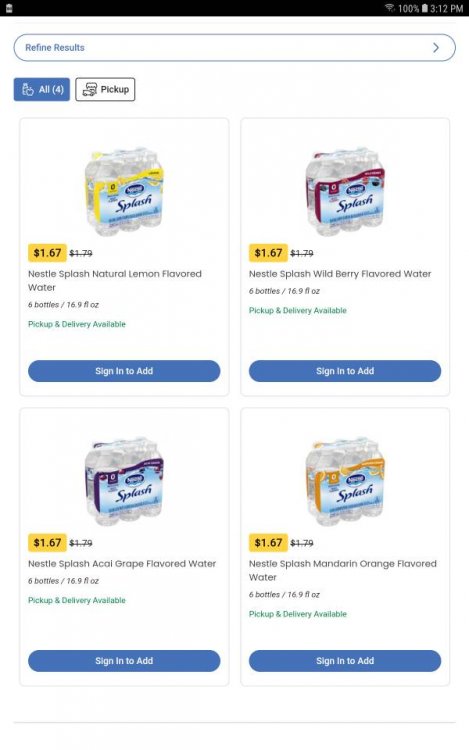
Found something I really like to drink in place of water. Nestle Splash has zero everything. The flavor is not sweet or strong. Just perfect for me. Has 4 flavors: mandarin orange, berry, lemon and grape. 6-pack at Walmart $1.79 and 3 six packs $5 at Kroger. It is purified water with just a little fruit flavor. Clear like water, no color. This is so much better than adding Mio or Crystal Light because has no sweetener and flavor very light. Screenshot_20200520-151204_Chrome.jpg
  • Replies 2
  • Views 1.1k
  • Created
  • Last Reply

Top Posters In This Topic

Posted Images

Featured Replies

It DOES contain sweetener called sucralose (known as Splenda).

  • Author

Yes it doesn't . Couldn't read small print without glasses. But no different than most protein shakes or artificial flavorings like MIO or CRYSTAL LIGHT. I like the clear coloring and very light flavor. So ok with me. Sucrulose doesn't affect blood sugar.

Join the conversation

You can post as a guest; create a free account to track replies, follow topics, and be part of the largest weight loss surgery community.

Join the conversation

You can post now and register later. If you have an account, sign in now to post with your account.

Guest
Reply to this topic...

Account

Navigation

Search

Search

Configure browser push notifications

Chrome (Android)
  1. Tap the lock icon next to the address bar.
  2. Tap Permissions → Notifications.
  3. Adjust your preference.
Chrome (Desktop)
  1. Click the padlock icon in the address bar.
  2. Select Site settings.
  3. Find Notifications and adjust your preference.