




Skip to content
View in the app

A better way to browse. Learn more.

BariatricPal

A full-screen app on your home screen with push notifications, badges and more.

To install this app on iOS and iPadOS
  1. Tap the Share icon in Safari
  2. Scroll the menu and tap Add to Home Screen.
  3. Tap Add in the top-right corner.
To install this app on Android
  1. Tap the 3-dot menu (⋮) in the top-right corner of the browser.
  2. Tap Add to Home screen or Install app.
  3. Confirm by tapping Install.

Weight loss slow down

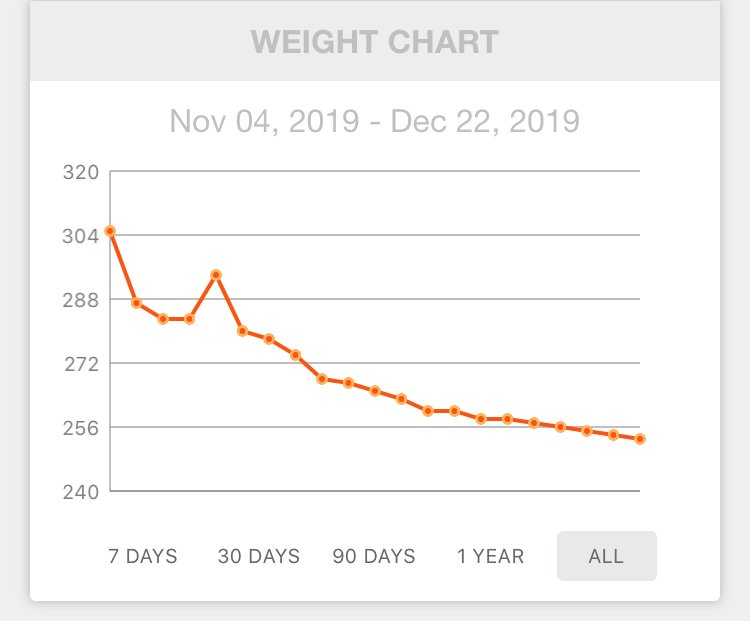
In the first year, when do you notice your weight loss slow down / stall? So far so good but I keep thinking it’s going to flatten out. It’s already starting. Kind of neat seeing the surgery peak. I guess that was IVs.

0F3247B2-3276-49E0-AE58-29A08A02BF4B.jpeg

  • Replies 3
  • Views 857
  • Created
  • Last Reply

Top Posters In This Topic

Most Popular Posts

  • Check into Intermittent Fasting. It's broken me through so many stalls. When I hit my hard stall at 230, I thought I was done for sure. I'm sitting between 180 and 190 now.

  • All of us Stall at different times - No real pattern

Posted Images
Featured Replies

All of us Stall at different times - No real pattern

Check into Intermittent Fasting. It's broken me through so many stalls. When I hit my hard stall at 230, I thought I was done for sure. I'm sitting between 180 and 190 now.

Stalls will happen intermittently throughout your weight loss journey. My longest stall was when I sat at the same weight for three weeks (just short of my goal) & then dropped 1/2kg overnight & almost the same the next day. Weight loss will slow the more weight you lose & the closer you get to your goal. Don’t give up. Keep up the work & the weight will keep coming off. It will happen.

Join the conversation

You can post now and register later. If you have an account, sign in now to post with your account.

Guest
Reply to this topic...

Trending Products

PatchAid Vitamin Patches

Account

Navigation

Search

Search

Configure browser push notifications

Chrome (Android)
  1. Tap the lock icon next to the address bar.
  2. Tap Permissions → Notifications.
  3. Adjust your preference.
Chrome (Desktop)
  1. Click the padlock icon in the address bar.
  2. Select Site settings.
  3. Find Notifications and adjust your preference.

