Skip to content
View in the app

A better way to browse. Learn more.

BariatricPal

A full-screen app on your home screen with push notifications, badges and more.

To install this app on iOS and iPadOS
  1. Tap the Share icon in Safari
  2. Scroll the menu and tap Add to Home Screen.
  3. Tap Add in the top-right corner.
To install this app on Android
  1. Tap the 3-dot menu (⋮) in the top-right corner of the browser.
  2. Tap Add to Home screen or Install app.
  3. Confirm by tapping Install.

Weight Loss Scale

So I was really happy with my weight loss 1 week after surgery and I’m just going to continue to keep doing what I’m doing and ride that good start. I will not continue to weigh myself on the scale everyday. How often do you weigh yourself because I think I need to do it a different way and have a weigh myself game plan.
  • Replies 18
  • Views 1.9k
  • Created
  • Last Reply

Top Posters In This Topic

Most Popular Posts

  • I TRY to only weigh once a week so I won't get discouraged with the daily fluctuations or stalls, but I find myself weighing every morning . . . and regretting it because the numbers don't change enou

  • Healthy_life2
    Healthy_life2

    Find what makes you comfortable. Some can weigh every day and can deal with seeing the weight fluctuations. If the scale is changing your mood/messing with your head, try weighing weekly. Y

  • Briswife15
    Briswife15

    Hey, I had surgery the same day as you did. I weigh myself every morning because I have found from previous experience that if I don't weight myself regularly the weight can creep back on. I don't g

Posted Images

Featured Replies

On 4/7/2019 at 10:41 AM, NYJenn said:

Can you tell us the scale you have? I’m interested in possibly getting a new one

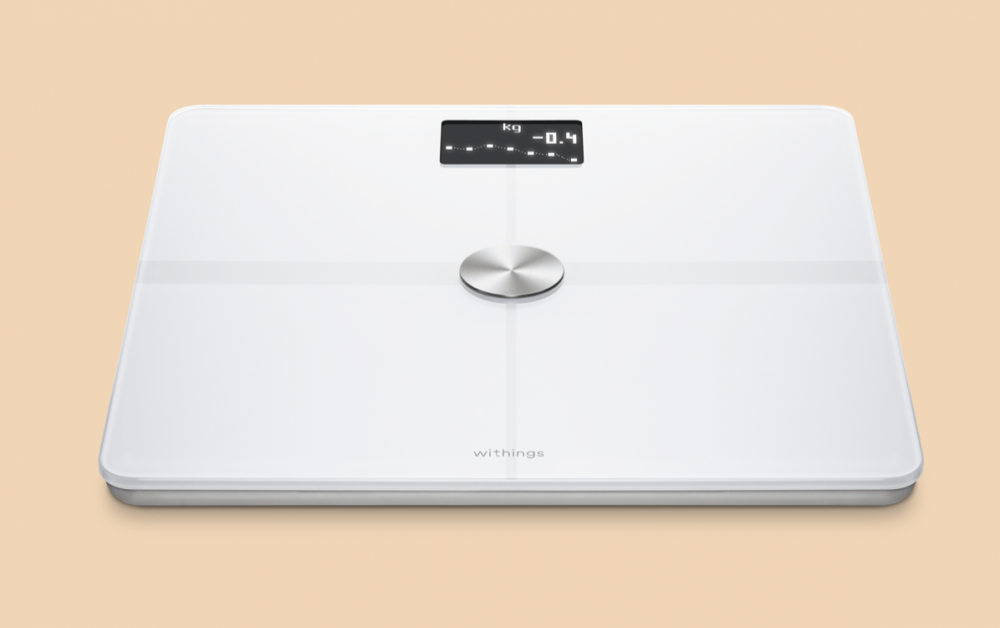
I'm not @lesslana, but this is the scale I have (the Withings Body+ smart scale).

https://www.withings.com/ca/en/body-plus

It's got pretty good reviews, tracks the main body composition info for up to 8 different people, is wi-fi and bluetooth enabled and now comes in 4 pretty colours, lol (I have white). It doesn't do heart rate though, but my watch does that so I can live with that.

Screen Shot 2019-04-08 at 5.58.41 PM.png

One last thing I want to add to this topic. Stalls happen, fluctuations happen, and some people can take it in stride, and others may tend to get anxious and stressed. If you are on anxious/stressed side, consider taking regular measurements of your "body parts" and you may see decreases in inches even if your scale doesn't move (or goes up).

Case in point: I measure myself every Wednesday (i.e., today is measurement day :). So in the last seven days, I actually GAINED** 1/2 a pound but I lost:

  • .25 inches on the measurements of each of my waist, right calf & right upper arm
  • .50 inches on the measurements of each of my hips & right thigh
  • and, thank goodness, ZERO inches from my boobs this week (I can't lose any more boobage, pls!)

** Now another thing that affects the number on the scale: bathroom usage. I haven't pooped going on 7 days now (this is the longest I've not gone since surgery), and I have an appt with my PCP this afternoon to discuss my current predicament since my various efforts to go have been unsuccessful so far :(

On ‎4‎/‎8‎/‎2019 at 6:07 PM, ms.sss said:

I'm not @lesslana, but this is the scale I have (the Withings Body+ smart scale).

https://www.withings.com/ca/en/body-plus

It's got pretty good reviews, tracks the main body composition info for up to 8 different people, is wi-fi and bluetooth enabled and now comes in 4 pretty colours, lol (I have white). It doesn't do heart rate though, but my watch does that so I can live with that.

Screen Shot 2019-04-08 at 5.58.41 PM.png

I have the same scale and only have good things to say about it. I weigh every morning and makes it easy to track and integrates with other apps like loseit to track intake as well.

Join the conversation

You can post now and register later. If you have an account, sign in now to post with your account.

Guest
Reply to this topic...

Trending Products

PatchAid Vitamin Patches

Account

Navigation

Search

Search

Configure browser push notifications

Chrome (Android)
  1. Tap the lock icon next to the address bar.
  2. Tap Permissions → Notifications.
  3. Adjust your preference.
Chrome (Desktop)
  1. Click the padlock icon in the address bar.
  2. Select Site settings.
  3. Find Notifications and adjust your preference.