




Having a NSV!
- Replies 4
- Views 535
- Created
- Last Reply
Top Posters In This Topic
-
Apple203 1 post
-
Frustr8 1 post
-
Sleeved36 1 post
-
Orchids&Dragons 1 post
.thumb.jpg.184c47e49002ebab60f6fe2be9349647.jpg)



Popular Days
Most Popular Posts
-
Maybe your hubby is just lop-sided? JK, congrats on the inches! That's what shows. Nobody sees your scale!
-
I think you are just in your Week 3, 3-week stall, which is just part of the process (but tough when you are in it). Its funny how the weight and measurements operate independently. This morning,
-
Rock the NSV baby, rock it to the wall and back?????
Posted Images
Featured Replies
Join the conversation
You can post as a guest; create a free account to track replies, follow topics, and be part of the largest weight loss surgery community.
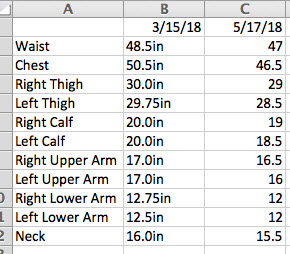
Okay so I haven't seen the scale move much in the last month, so I decided to redo my measurements. My hubby took them the night before surgery and then again today. I have lost quite a bit in inches which is really great for me to see and it helps me know this surgery is working even tho the scale isn't telling me it is. I also am seeing my right side is larger than my left...