Skip to content
View in the app

A better way to browse. Learn more.

BariatricPal

A full-screen app on your home screen with push notifications, badges and more.

To install this app on iOS and iPadOS
  1. Tap the Share icon in Safari
  2. Scroll the menu and tap Add to Home Screen.
  3. Tap Add in the top-right corner.
To install this app on Android
  1. Tap the 3-dot menu (⋮) in the top-right corner of the browser.
  2. Tap Add to Home screen or Install app.
  3. Confirm by tapping Install.

Big milestone today!

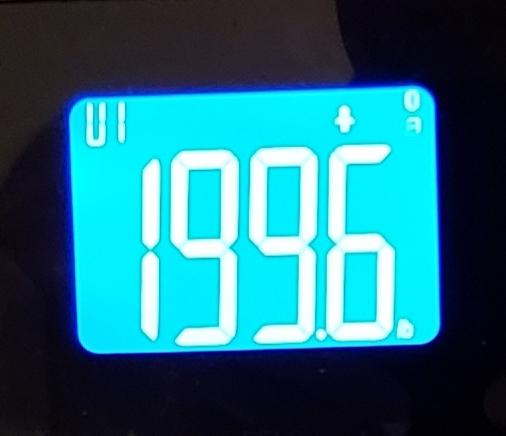
Woke up this morning and did my daily weigh-in and was excited (and relieved) to finally be under 200lbs! I've been bouncing around the 200 mark for over a week. Weight is now 199.6...just barely in there, but I'll take it! lol. Getting below 200 was my first major goal since having surgery on Jan. 11 (down from 243 day of surgery). I've also gone from a 38-40 in pants size, down to a 34 inch waist. Really glad I had this surgery!

scale.jpg

  • Replies 8
  • Views 972
  • Created
  • Last Reply

Featured Replies

Awesome! Congrats!

Welcome to Onederland! I can't wait to join you. about 40 more lbs to go!

  • Author

Thanks! Good luck AshAsh1, you'll get there...great progress so far!

YEAH!!!!!! Congrats!

Awesome! That's so exciting. Congratulations

Sent from my SM-G950U using BariatricPal mobile app

Congratulations!!! ???

That’s awesome! I hope to get there in a few months too! Hitting Onederland is a huge accomplishment to be proud of!

On 5/17/2018 at 1:49 PM, VSGnewguy said:

Weight is now 199.6...

@VSGnewguy

Whoopi, whoopi

have you sent out your new address labels?

hurry, mail before stamp price increases!! :D

Onderland, Texas.

keep up the good work

kathy

Archived

This topic is now archived and is closed to further replies.

Trending Products

PatchAid Vitamin Patches

Account

Navigation

Search

Search

Configure browser push notifications

Chrome (Android)
  1. Tap the lock icon next to the address bar.
  2. Tap Permissions → Notifications.
  3. Adjust your preference.
Chrome (Desktop)
  1. Click the padlock icon in the address bar.
  2. Select Site settings.
  3. Find Notifications and adjust your preference.