Skip to content
View in the app

A better way to browse. Learn more.

BariatricPal

A full-screen app on your home screen with push notifications, badges and more.

To install this app on iOS and iPadOS
  1. Tap the Share icon in Safari
  2. Scroll the menu and tap Add to Home Screen.
  3. Tap Add in the top-right corner.
To install this app on Android
  1. Tap the 3-dot menu (⋮) in the top-right corner of the browser.
  2. Tap Add to Home screen or Install app.
  3. Confirm by tapping Install.

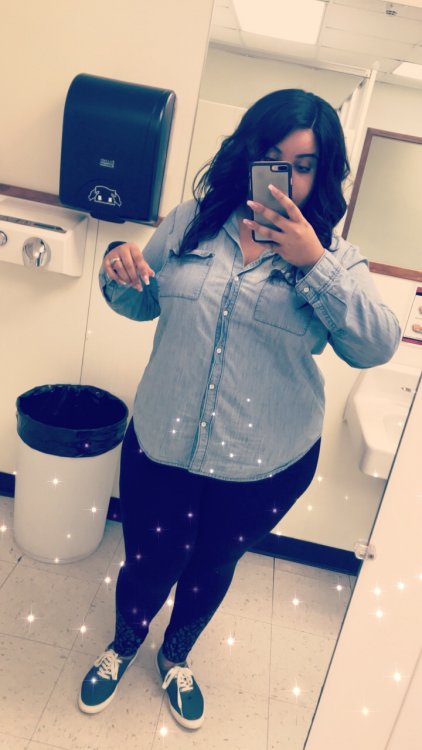
Before Picture

Decided to post one of my before pics. Surgery date is April 24th and approaching quickly so I figured it was time to snap one! IMG_3232.JPG

  • Replies 2
  • Views 749
  • Created
  • Last Reply

Featured Replies

I’m with you. Also surgery the 24th. Must get that pic taken.


12 hours ago, CurlyV said:

Decided to post one of my before pics.

@CurlyV

good for you!! most of us hate pics from the past. seeing the weight on our body.:angry:

for me (and you too?), i think its good to remember our roots. i keep a copy of my

before pic in my wallet. i proudly show it off when WLS subject comes up. i suggest

all newbies et al do the same!! good luck with your surgery - kathy

Archived

This topic is now archived and is closed to further replies.

Trending Products

PatchAid Vitamin Patches

Account

Navigation

Search

Search

Configure browser push notifications

Chrome (Android)
  1. Tap the lock icon next to the address bar.
  2. Tap Permissions → Notifications.
  3. Adjust your preference.
Chrome (Desktop)
  1. Click the padlock icon in the address bar.
  2. Select Site settings.
  3. Find Notifications and adjust your preference.