Skip to content
View in the app

A better way to browse. Learn more.

BariatricPal

A full-screen app on your home screen with push notifications, badges and more.

To install this app on iOS and iPadOS
  1. Tap the Share icon in Safari
  2. Scroll the menu and tap Add to Home Screen.
  3. Tap Add in the top-right corner.
To install this app on Android
  1. Tap the 3-dot menu (⋮) in the top-right corner of the browser.
  2. Tap Add to Home screen or Install app.
  3. Confirm by tapping Install.

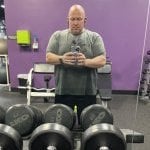
Weighed in today!

I lost 8 pounds in 8 days. 16 pounds since March 9th & I’m at 285 now. Today is the day I’m stepping up my Cardio significantly. Hopefully I see even bigger changes moving forward. I’m down 55 pounds since mid January.

  • Replies 23
  • Views 1.8k
  • Created
  • Last Reply

Featured Replies

Ha! Much! Helps us reading comprehension impaired!

  • Author
15 minutes ago, angyplus5 said:

Your doing great!!! Keep it up!!!

Sent from my SM-G930VL using BariatricPal mobile app

Thanks! Slow & steady wins the race.

Thanks! Slow & steady wins the race.

yes it does!!!

Sent from my SM-G930VL using BariatricPal mobile app

Stay slow and steady on bumping up workout, had a few dizzy spells when i went to hard at first, but keep up the good work.

Fantastic work, sir!

  • Author
9 hours ago, boatnam1 said:

Stay slow and steady on bumping up workout, had a few dizzy spells when i went to hard at first, but keep up the good work.

So far so good!

  • Author
6 hours ago, BT816 said:

Fantastic work, sir!

Thanks!

Archived

This topic is now archived and is closed to further replies.

Trending Products

PatchAid Vitamin Patches

Account

Navigation

Search

Search

Configure browser push notifications

Chrome (Android)
  1. Tap the lock icon next to the address bar.
  2. Tap Permissions → Notifications.
  3. Adjust your preference.
Chrome (Desktop)
  1. Click the padlock icon in the address bar.
  2. Select Site settings.
  3. Find Notifications and adjust your preference.