Skip to content
View in the app

A better way to browse. Learn more.

BariatricPal

A full-screen app on your home screen with push notifications, badges and more.

To install this app on iOS and iPadOS
  1. Tap the Share icon in Safari
  2. Scroll the menu and tap Add to Home Screen.
  3. Tap Add in the top-right corner.
To install this app on Android
  1. Tap the 3-dot menu (⋮) in the top-right corner of the browser.
  2. Tap Add to Home screen or Install app.
  3. Confirm by tapping Install.

Surgerversary

  • Replies 12
  • Views 1.8k
  • Created
  • Last Reply

Featured Replies

Congratulations. I like your shoes. ;-):rolleyes:B):lol:B):P:)

you look amazing!!! you should be very proud of yourself!!!

Sent from my SM-G930VL using BariatricPal mobile app

I'm trying to get this straight..

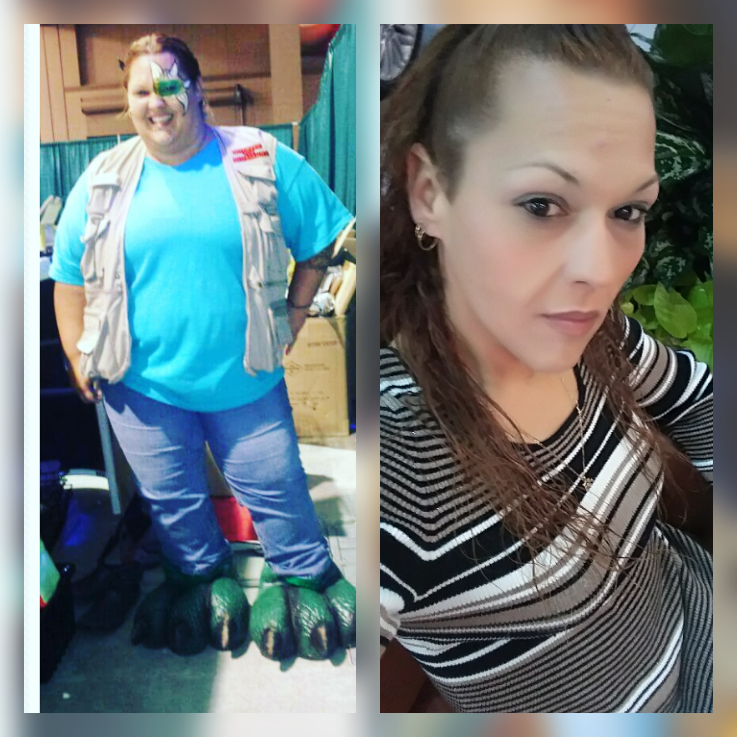
So you started at 412lbs, and now you are 102lbs? That is a ...phenomenal... loss! Not sure that I've heard of someone losing so much before!

What did your diet/exercise plan look like?

Tomorrow is my one year anniversary for my surgery and im down 310lbs i went from a size 28 to a size 7 and i feel awesome except i have no butt now lol photocollage_201711913482285.png.9bfc2f227b9fd8541325670023cac1ce.png
Sent from my LGMP260 using BariatricPal mobile app


WOW! You look great Happy Surgiversary!


5' 5"
HW: 259
CW: 235
GOAL: Healthy and hard 140-ish?
  • 2 weeks later...

Wow, such an amazing transformation. Thanks for sharing.

Archived

This topic is now archived and is closed to further replies.

Trending Products

PatchAid Vitamin Patches

Account

Navigation

Search

Search

Configure browser push notifications

Chrome (Android)
  1. Tap the lock icon next to the address bar.
  2. Tap Permissions → Notifications.
  3. Adjust your preference.
Chrome (Desktop)
  1. Click the padlock icon in the address bar.
  2. Select Site settings.
  3. Find Notifications and adjust your preference.