Skip to content
View in the app

A better way to browse. Learn more.

BariatricPal

A full-screen app on your home screen with push notifications, badges and more.

To install this app on iOS and iPadOS
  1. Tap the Share icon in Safari
  2. Scroll the menu and tap Add to Home Screen.
  3. Tap Add in the top-right corner.
To install this app on Android
  1. Tap the 3-dot menu (⋮) in the top-right corner of the browser.
  2. Tap Add to Home screen or Install app.
  3. Confirm by tapping Install.
  • Appearance

Join BariatricPal free

  • Ask your own questions
  • Reply and follow topics
  • Message other members
  • No cost, no spam

Signiture help

I have read the FAQ's and at least 20 different posts on editing signatures but for the life of me I cannot figure out where to add the text. I can see how to change my ticker. I need it spelled out, I've spent 30 minutes on this! But, hey, I'm drinking my water in the process. Help me out, please!

  • Replies 20
  • Views 3k
  • Created
  • Last Reply

Top Posters In This Topic

Most Popular Posts

  • Click on your username in the header of the website, and then click Account Settings. There, you'll see on the left side of the screen "Signature". If you click on that, you'll be able to edit your

  • Nonexistent on android phones.

  • Strivingforbetter
    Strivingforbetter

    Well, at least you only have two now....that's progress.

Posted Images
Featured Replies

12 minutes ago, Cloebird said:

I have read the FAQ's and at least 20 different posts on editing signatures but for the life of me I cannot figure out where to add the text. I can see how to change my ticker. I need it spelled out, I've spent 30 minutes on this! But, hey, I'm drinking my Water in the process. Help me out, please!

Click on your username in the header of the website, and then click Account Settings. There, you'll see on the left side of the screen "Signature". If you click on that, you'll be able to edit your signature. Or, you can just click here.

Hopefully that works for you :) But, I do have a question....did you really find 20 different topics where users were attempting to edit their signature and couldn't locate it? Generally speaking, I find that our members are very willing to help newcomers and have seen a lot of questions asked that have been answered by the community - and we're very proud of that :)

5 hours ago, Ken S. said:

Click on your username in the header of the website, and then click Account Settings. There, you'll see on the left side of the screen "Signature". If you click on that, you'll be able to edit your signature. Or, you can just click here.

Hopefully that works for you :) But, I do have a question....did you really find 20 different topics where users were attempting to edit their signature and couldn't locate it? Generally speaking, I find that our members are very willing to help newcomers and have seen a lot of questions asked that have been answered by the community - and we're very proud of that :)

Ken,

I really don't think that tickers are working now. Mine is turned on, but disappeared a long time ago. I have spoken to others that have had theirs disappear as well, and can't get them back. I haven't seen a ticker in a looong time, and I am on this site everyday. I think something might be wrong.

40 minutes ago, DropWt4Life said:

Ken,

I really don't think that tickers are working now. Mine is turned on, but disappeared a long time ago. I have spoken to others that have had theirs disappear as well, and can't get them back. I haven't seen a ticker in a looong time, and I am on this site everyday. I think something might be wrong.

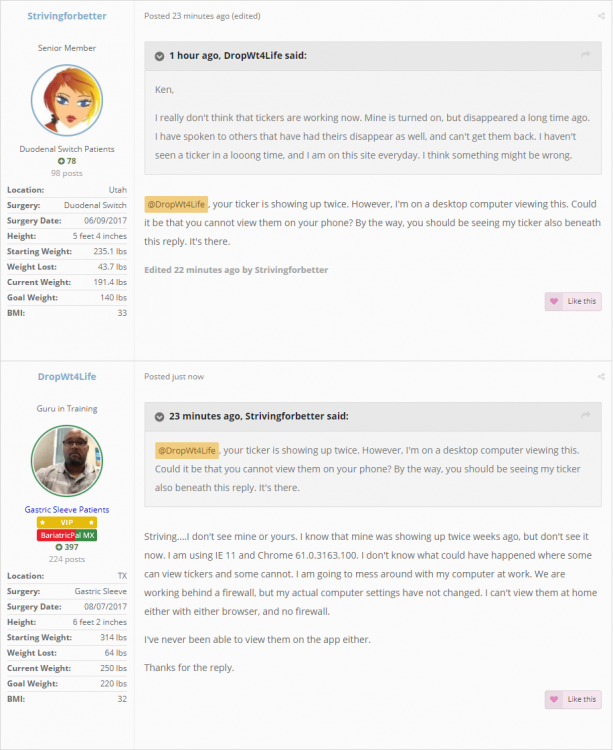
@DropWt4Life, your ticker is showing up twice. However, I'm on a desktop computer viewing this. Could it be that you cannot view them on your phone? By the way, you should be seeing my ticker also beneath this reply. It's there.

Edited by Strivingforbetter

8 minutes ago, Strivingforbetter said:

@DropWt4Life, your ticker is showing up twice. However, I'm on a desktop computer viewing this. Could it be that you cannot view them on your phone? By the way, you should be seeing my ticker also beneath this reply. It's there.

Striving....I don't see mine or yours. I know that mine was showing up twice weeks ago, but don't see it now. I am using IE 11 and Chrome 61.0.3163.100. I don't know what could have happened where some can view tickers and some cannot. I am going to mess around with my computer at work. We are working behind a firewall, but my actual computer settings have not changed. I can't view them at home either with either browser, and no firewall.

I've never been able to view them on the app either.

Thanks for the reply.

Nonexistent on android phones.

I have an Iphone 6s, and can't see anything either.

This is what I see. There are no tickers present.

Signiture help.png

  • Author
9 hours ago, Ken S. said:

But, I do have a question....did you really find 20 different topics where users were attempting to edit their signature and couldn't locate it?

No, not on locating it. Just editing and problems with it I was hoping one of those would show how to find it. I did a search of the assistance and suggestions forum.

Thanks for the link, it seems so obvious now!

  • Author

BTW, I can see your tickers fine, however, I can't on my work computer. :huh:

9 hours ago, DropWt4Life said:

Ken,

I really don't think that tickers are working now. Mine is turned on, but disappeared a long time ago. I have spoken to others that have had theirs disappear as well, and can't get them back. I haven't seen a ticker in a looong time, and I am on this site everyday. I think something might be wrong.

You changed your settings at some point :-) You disabled the "View signatures?" setting in your Account Settings. I've gone ahead and re-enabled that for you. You should be able to see them now, but if not, don't hesitate to let me know!

4 hours ago, Ken S. said:

You changed your settings at some point :-) You disabled the "View signatures?" setting in your Account Settings. I've gone ahead and re-enabled that for you. You should be able to see them now, but if not, don't hesitate to let me know!

Thanks. I can see them now. Any way to show 1 ticker instead of 3?

22 hours ago, DropWt4Life said:

I have an Iphone 6s, and can't see anything either.

@DropWt4Life. I was just going to mention your three tickers, but then I read your post above. Sounds like you have things figured out.

Edited by Strivingforbetter

1 hour ago, Strivingforbetter said:

@DropWt4Life. I was just going to mention your three tickers, but then I read your post above. Sounds like you have things figured out.

Thanks. If Ken can help me get it corrected, I will never touch it again. LOL.

16 hours ago, DropWt4Life said:

Thanks. If Ken can help me get it corrected, I will never touch it again. LOL.

Well, at least you only have two now....that's progress.

Join the conversation

You can post as a guest; create a free account to track replies, follow topics, and be part of the largest weight loss surgery community.

Join the conversation

You can post now and register later. If you have an account, sign in now to post with your account.

Guest
Reply to this topic...

Account

Navigation

Search

Search

Configure browser push notifications

Chrome (Android)
  1. Tap the lock icon next to the address bar.
  2. Tap Permissions → Notifications.
  3. Adjust your preference.
Chrome (Desktop)
  1. Click the padlock icon in the address bar.
  2. Select Site settings.
  3. Find Notifications and adjust your preference.