Skip to content
View in the app

A better way to browse. Learn more.

BariatricPal

A full-screen app on your home screen with push notifications, badges and more.

To install this app on iOS and iPadOS
  1. Tap the Share icon in Safari
  2. Scroll the menu and tap Add to Home Screen.
  3. Tap Add in the top-right corner.
To install this app on Android
  1. Tap the 3-dot menu (⋮) in the top-right corner of the browser.
  2. Tap Add to Home screen or Install app.
  3. Confirm by tapping Install.
  • Appearance

Join BariatricPal free

  • Ask your own questions
  • Reply and follow topics
  • Message other members
  • No cost, no spam

Home!!!!! weight loss!

I got home last night! I slept wo well, that I went straight through my alarm this morn! So thankful that my hubby took the boys to school <3

Anyway, I lost 5 lbs since surgery 2/17 and I am trying to put my current weight in, but I can't figure out how to with this new layout... Anybody have any ideas?

  • Replies 6
  • Views 491
  • Created
  • Last Reply

Top Posters In This Topic

Most Popular Posts

  • doingit4me2017
    doingit4me2017

    It's great when you're home and you can sleep so good!. congrats on the weight loss!

  • 50yearoldme
    50yearoldme

    I'm using that app too. But i wanted to update my weight on this site and they've changed sho much i can't figure out how.[emoji19]

  • I use myfitnesspal to track my activity, food and hydration.

Posted Images
Featured Replies

I actually use an app called Baritastic to track my weight, meals, exercise and water intake. It's a pretty good app.


  • Author
I actually use an app called Baritastic to track my weight, meals, exercise and Water intake. It's a pretty good app.


I'm using that app too. But i wanted to update my weight on this site and they've changed sho much i can't figure out how.[emoji19]


It's great when you're home and you can sleep so good!. congrats on the weight loss!

I use myfitnesspal to track my activity, food and hydration.

16 hours ago, 50yearoldme said:


I'm using that app too. But i wanted to update my weight on this site and they've changed sho much i can't figure out how.emoji19.png


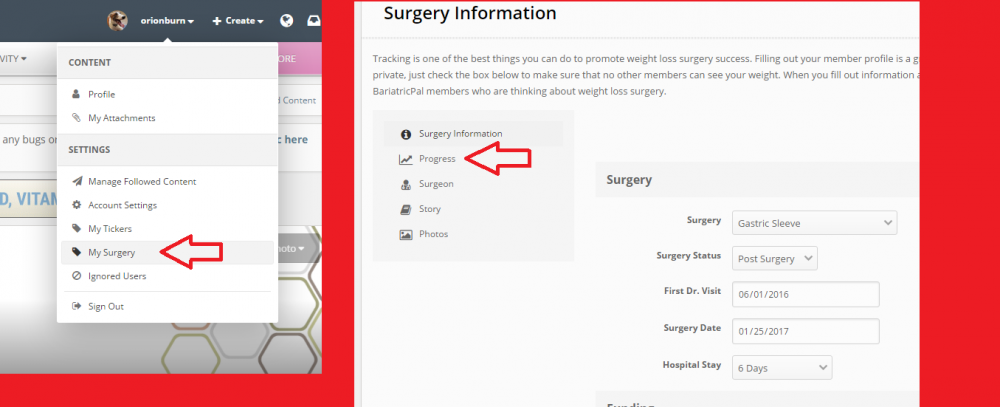
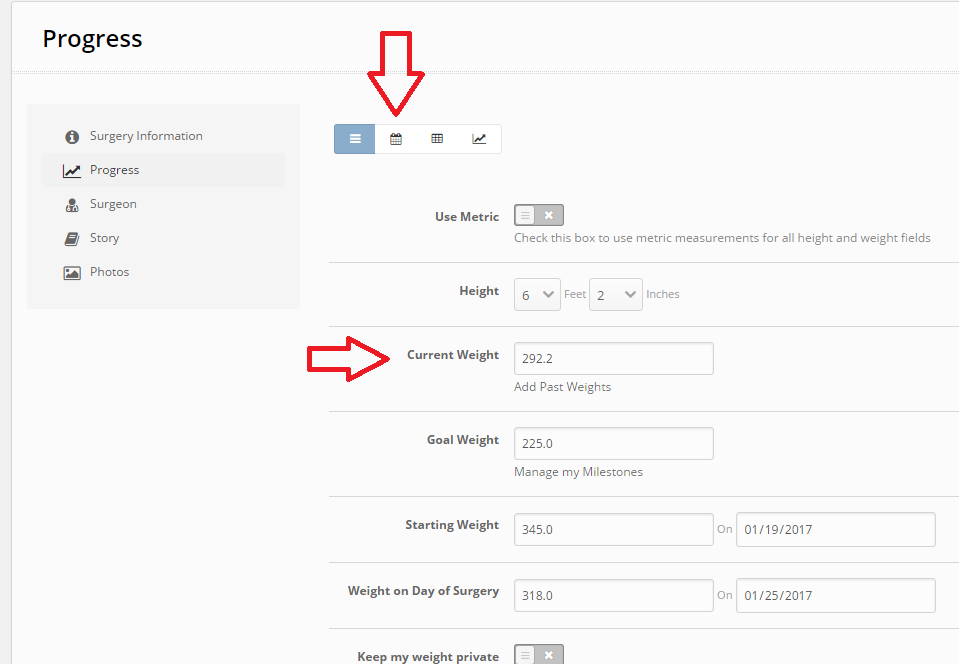
Click on your username in the upper right corner. In the drop down choose "My Surgery." In the next screen there are some options on the left hand side. Choose "Progress." In the following screen you will see the fields to enter your current weight. The options at the top let you see your past weights if you want to see progress. The far right one will put it into a graph format tracking you weight.

howto.png

howto2.png

  • Author

THANK YOU!

Join the conversation

You can post as a guest; create a free account to track replies, follow topics, and be part of the largest weight loss surgery community.

Join the conversation

You can post now and register later. If you have an account, sign in now to post with your account.

Guest
Reply to this topic...

Account

Navigation

Search

Search

Configure browser push notifications

Chrome (Android)
  1. Tap the lock icon next to the address bar.
  2. Tap Permissions → Notifications.
  3. Adjust your preference.
Chrome (Desktop)
  1. Click the padlock icon in the address bar.
  2. Select Site settings.
  3. Find Notifications and adjust your preference.