Skip to content
View in the app

A better way to browse. Learn more.

BariatricPal

A full-screen app on your home screen with push notifications, badges and more.

To install this app on iOS and iPadOS
  1. Tap the Share icon in Safari
  2. Scroll the menu and tap Add to Home Screen.
  3. Tap Add in the top-right corner.
To install this app on Android
  1. Tap the 3-dot menu (⋮) in the top-right corner of the browser.
  2. Tap Add to Home screen or Install app.
  3. Confirm by tapping Install.

Goal Achieved!

  • Popular Post

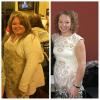
I cant even describe the feeling!

Starting weight January 2016: 261lbs

SW- March 2016: 239lbs

CW/GW-February 2017: 136lbs

post-286551-14863487455536_thumb.jpg

Sent from my SAMSUNG-SM-G920A using the BariatricPal App

  • Replies 37
  • Views 2.9k
  • Created
  • Last Reply

Featured Replies

Congratulations. You look marvelous

  • Author

You look amazing and no excess skin! Congrats!

Sent from my SM-N910T using the BariatricPal App

Thank you, but don't be deceived, there is excess skin! Mostly my upper arms, stomach, and upper thighs. It's not horrible and I probably wouldn't consider plastic surgery but I'll never be wearing a bikini. I was obese since age 5 so there's no coming back from 30 years of stretched skin.

Im okay with all of this though. I consider it my battle scar, proof I won the fight!

Sent from my SAMSUNG-SM-G920A using the BariatricPal App

Congrats!!!

Sent from my iPhone using the BariatricPal App

Awesome

Loving Me

CONGRATS!!

Sent from my SM-N920V using the BariatricPal App

Archived

This topic is now archived and is closed to further replies.

Trending Products

PatchAid Vitamin Patches

Account

Navigation

Search

Search

Configure browser push notifications

Chrome (Android)
  1. Tap the lock icon next to the address bar.
  2. Tap Permissions → Notifications.
  3. Adjust your preference.
Chrome (Desktop)
  1. Click the padlock icon in the address bar.
  2. Select Site settings.
  3. Find Notifications and adjust your preference.