




- Replies 9
- Views 1.1k
- Created
- Last Reply
Top Posters In This Topic
-
DahliaIris 2 posts
-
AMVV12 2 posts
-
highfunctioningfatman 1 post
-
chase67 1 post



Popular Days
Most Popular Posts
-
You can definitely see the changes. Congrats!
-
Wow you you look great. I can really see the difference. Sent from my 5056N using the BariatricPal App
-
A big, big difference! Keep it up. You're looking fab!!!! Sent from my SAMSUNG-SM-G935A using the BariatricPal App

Posted Images
Featured Replies
Join the conversation
You can post as a guest; create a free account to track replies, follow topics, and be part of the largest weight loss surgery community.
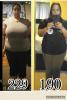
Im 9 weeks post op..feeling little tired some days..Im taking my Protein and liquids...plus Vitamins...I am noticing changes already!
HW 229
SW 212
CW 188
GW 140
11/08/2016 surgery day
VSG
Sent from my LG-H901 using the BariatricPal App