Skip to content
View in the app

A better way to browse. Learn more.

BariatricPal

A full-screen app on your home screen with push notifications, badges and more.

To install this app on iOS and iPadOS
  1. Tap the Share icon in Safari
  2. Scroll the menu and tap Add to Home Screen.
  3. Tap Add in the top-right corner.
To install this app on Android
  1. Tap the 3-dot menu (⋮) in the top-right corner of the browser.
  2. Tap Add to Home screen or Install app.
  3. Confirm by tapping Install.

9/14/16 Bypass Surgery

  • Replies 30
  • Views 2.5k
  • Created
  • Last Reply

Featured Replies

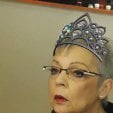
Awesome!!! You look fabulous!! Keep it up girl

Holy cow! I wouldn't have recognized you from one pic to the next! Your face is beautiful!

I'm also a bit jealous that you're keeping so much up top. I am.....floppy.

Sent from my SM-G925V using the BariatricPal App

You just had your surgery in September! Already you've done amazing.

Edited by marieac2

On my 2 week Optifast liquid diet, just weighed myself lost 10lbs first week! Encouraging, by-pass surgery next Monday 28th!!

  • Author

6233db9e07cb7970d6d9aa7c088cf3d4.jpg

You're doing great! Are you exercising?

Sent from my SM-G935T using the BariatricPal App

Thank you so much 47NHeaven: , to be honest no not really because I do still have knee pain, but I do work and walking a lot by doing that

Sent from my N9520 using the BariatricPal App

Archived

This topic is now archived and is closed to further replies.

Trending Products

PatchAid Vitamin Patches

Account

Navigation

Search

Search

Configure browser push notifications

Chrome (Android)
  1. Tap the lock icon next to the address bar.
  2. Tap Permissions → Notifications.
  3. Adjust your preference.
Chrome (Desktop)
  1. Click the padlock icon in the address bar.
  2. Select Site settings.
  3. Find Notifications and adjust your preference.