




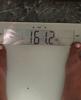
Down 75, 25 to go!
- Replies 11
- Views 1.1k
- Created
- Last Reply
Top Posters In This Topic
-
cat.jackson89 3 posts
-
James Marusek 1 post
-
KristenLe 1 post
-
skinnyjeansatlast 1 post




Popular Days
Most Popular Posts
-
This makes it 77 pounds down! 23 to go.. It's been 16 years since I've seen the scale this low while I'm standing on it! Sent from my iPhone using the BariatricPal App
-
Thank you for the inspiration! I am going in on Tuesday (yikes)! You look beautiful.
-
Best wishes! This journey has been amazing for me! The first 2-3 weeks are the hardest. Remember that even though you're an adult, getting your back patted after surgery for the first few days is the
Posted Images

Featured Replies
Join the conversation
You can post as a guest; create a free account to track replies, follow topics, and be part of the largest weight loss surgery community.
Sent from my iPhone using the BariatricPal App