Skip to content
View in the app

A better way to browse. Learn more.

BariatricPal

A full-screen app on your home screen with push notifications, badges and more.

To install this app on iOS and iPadOS
  1. Tap the Share icon in Safari
  2. Scroll the menu and tap Add to Home Screen.
  3. Tap Add in the top-right corner.
To install this app on Android
  1. Tap the 3-dot menu (⋮) in the top-right corner of the browser.
  2. Tap Add to Home screen or Install app.
  3. Confirm by tapping Install.

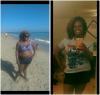
Summer Comparsion Pics

  • Replies 17
  • Views 2.1k
  • Created
  • Last Reply

Featured Replies

You look amazing!

Just started, so slow currently. I have my first appointment with a surgeon July 21st. I'm excited to get it started. :)

You look so happy and healthy. Good for you. Keep smiling!!!! :) :) :)

Sent from my iPhone using the BariatricPal App

  • Author

@@Fettchick83 congrats on the hard work

Thank you! Are you enjoying your journey?

Sent from my SM-N920P using the BariatricPal App

You look so happy and healthy. Good for you. Keep smiling!!!! :) :) :)

Sent from my iPhone using the BariatricPal App

It's alot cooler in this summer heat being smaller lol. How is your journey going?

Sent from my SM-N920P using the BariatricPal App

You look so happy and beautiful!

Sent from my iPhone using the BariatricPal App

Thank you. What do you love most about this journey?

Sent from my SM-N920P using the BariatricPal App

Just started, so slow currently. I have my first appointment with a surgeon July 21st. I'm excited to get it started. :)

You will be in surgery before you know it! What surgery do you wish to have?

Sent from my SM-N920P using the BariatricPal App

Sent from my SM-N920P using the BariatricPal App

You look so happy and beautiful!

Sent from my iPhone using the BariatricPal App

Thank you. What do you love most about this journey?

Sent from my SM-N920P using the BariatricPal App

Hope I edited this correctly! I have not found a favorite part yet as I am only two weeks into it!

Sent from my iPhone using the BariatricPal App

You look absolutely gorgeous????????????????????????

Archived

This topic is now archived and is closed to further replies.

Trending Products

PatchAid Vitamin Patches

Account

Navigation

Search

Search

Configure browser push notifications

Chrome (Android)
  1. Tap the lock icon next to the address bar.
  2. Tap Permissions → Notifications.
  3. Adjust your preference.
Chrome (Desktop)
  1. Click the padlock icon in the address bar.
  2. Select Site settings.
  3. Find Notifications and adjust your preference.