Skip to content
View in the app

A better way to browse. Learn more.

BariatricPal

A full-screen app on your home screen with push notifications, badges and more.

To install this app on iOS and iPadOS
  1. Tap the Share icon in Safari
  2. Scroll the menu and tap Add to Home Screen.
  3. Tap Add in the top-right corner.
To install this app on Android
  1. Tap the 3-dot menu (⋮) in the top-right corner of the browser.
  2. Tap Add to Home screen or Install app.
  3. Confirm by tapping Install.

Before and after

  • Popular Post

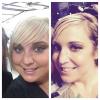
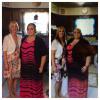
I decided to do a before and after because even though I knew I had lost weight, I just couldn't see it. These pics were taken exactly a year apart. The pic on the right is me at about 351. The left is me now 4 months post op and down 78 pounds. I'm glad that I kept that dress! Everyone should take lots of pictures! After looking at this I finally see it! post-227134-14309680457263_thumb.jpg

  • Replies 11
  • Views 1.1k
  • Created
  • Last Reply

Featured Replies

Way to go! And to think it just keep getting better too. ☺️

  • 3 months later...
  • Author

You look great????

thank you!

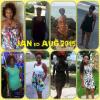
The first pic is at my heaviest, the second pic is today. ( surgery 5/20/15) I feel great!!!!

You look fabulous !!!
  • Author

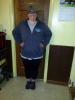
Another recent before and after. We all need to do this! It is amazing! post-227134-14403484360455_thumb.jpg

Went under on Feb 19th...haven't looked back

You look fantastic!!

The first pic is at my heaviest, the second pic is today. ( surgery 5/20/15) I feel great!!!!

Amazing transformation!

Archived

This topic is now archived and is closed to further replies.

Trending Products

PatchAid Vitamin Patches

Account

Navigation

Search

Search

Configure browser push notifications

Chrome (Android)
  1. Tap the lock icon next to the address bar.
  2. Tap Permissions → Notifications.
  3. Adjust your preference.
Chrome (Desktop)
  1. Click the padlock icon in the address bar.
  2. Select Site settings.
  3. Find Notifications and adjust your preference.