Skip to content
View in the app

A better way to browse. Learn more.

BariatricPal

A full-screen app on your home screen with push notifications, badges and more.

To install this app on iOS and iPadOS
  1. Tap the Share icon in Safari
  2. Scroll the menu and tap Add to Home Screen.
  3. Tap Add in the top-right corner.
To install this app on Android
  1. Tap the 3-dot menu (⋮) in the top-right corner of the browser.
  2. Tap Add to Home screen or Install app.
  3. Confirm by tapping Install.

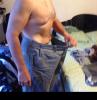
6 month pic

Went to go put on what I thought where a new pair of a shorts not realizing they where new last summer.

post-201164-0-46722200-1403114640_thumb.jpg

  • Replies 12
  • Views 1.6k
  • Created
  • Last Reply

Featured Replies

Way to go!!! Time for new NEW shorts!

Wow I bet that was a shocker! Congrats!

Nice :)

Wow! You look fantastic! Looks like a 6-pack to me!

Woo hoo!!!

Amazing!! Oh, I can't wait to have the same experience!

You're looking great!

  • Author

Thanks for all the compliments. This has been an amazing journey and gets better every day.

Wow! You look fantastic! Looks like a 6-pack to me!

Working abs and core everyday.
  • Author

I guess math isn't my best subject, it should of been 5months not 6.

I guess math isn't my best subject, it should of been 5months not 6.

Even better !

THAT IS AWESOME!!!! WOOHOO!!! Time for new shorts!!

Archived

This topic is now archived and is closed to further replies.

Trending Products

PatchAid Vitamin Patches

Account

Navigation

Search

Search

Configure browser push notifications

Chrome (Android)
  1. Tap the lock icon next to the address bar.
  2. Tap Permissions → Notifications.
  3. Adjust your preference.
Chrome (Desktop)
  1. Click the padlock icon in the address bar.
  2. Select Site settings.
  3. Find Notifications and adjust your preference.