Skip to content
View in the app

A better way to browse. Learn more.

BariatricPal

A full-screen app on your home screen with push notifications, badges and more.

To install this app on iOS and iPadOS
  1. Tap the Share icon in Safari
  2. Scroll the menu and tap Add to Home Screen.
  3. Tap Add in the top-right corner.
To install this app on Android
  1. Tap the 3-dot menu (⋮) in the top-right corner of the browser.
  2. Tap Add to Home screen or Install app.
  3. Confirm by tapping Install.

So Far....

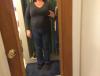
I promised myself I would take pictures of my progress mainly because it is so hard to see changes day to day....below is high weight (about 230), the day of surgery(220) and today (207.5)....almost 3 weeks out. Please ignore my filthy house and scowl (oh, and the horrible house shoes in the first phot!) :)

Little by little I am getting there

post-202610-0-43007900-1399850785_thumb.jpg

post-202610-0-78158100-1399850835_thumb.jpg

post-202610-0-44223700-1399850852_thumb.jpg

Edited by SparkleCat

  • Replies 2
  • Views 636
  • Created
  • Last Reply

Featured Replies

Little by little I am getting there - please ignore my filthy house

@@SparkleCat

its great to take pics as time passes by :)

you are terrific :)

butttttt - as far as your filthy house!!!! :angry: :blink:

you should now have more energy to clean up!!! :lol:

keep up the good work for the rest of your healthier, happier, longer life :)

good luck :)

kathy

congrats

Edited by proudgrammy

  • Author

butttttt - as far as your filthy house!!!! :angry: :blink:

you should now have more energy to clean up!!! :lol:

keep up the good work for the rest of your healthier, happier, longer life :)

Ha! I'm afraid I can't blame my horrible housekeeping skills on surgery...I have plenty of energy, but have never been a great tidier upper! I wouldn't qualify for hoarders...but my coffee table is never clean!

Archived

This topic is now archived and is closed to further replies.

Trending Products

PatchAid Vitamin Patches

Account

Navigation

Search

Search

Configure browser push notifications

Chrome (Android)
  1. Tap the lock icon next to the address bar.
  2. Tap Permissions → Notifications.
  3. Adjust your preference.
Chrome (Desktop)
  1. Click the padlock icon in the address bar.
  2. Select Site settings.
  3. Find Notifications and adjust your preference.