Skip to content
View in the app

A better way to browse. Learn more.

BariatricPal

A full-screen app on your home screen with push notifications, badges and more.

To install this app on iOS and iPadOS
  1. Tap the Share icon in Safari
  2. Scroll the menu and tap Add to Home Screen.
  3. Tap Add in the top-right corner.
To install this app on Android
  1. Tap the 3-dot menu (⋮) in the top-right corner of the browser.
  2. Tap Add to Home screen or Install app.
  3. Confirm by tapping Install.

Hit Onederland Today!

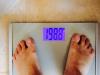
Happy and grateful to be in onederland this morning. It's been a long hard fight to reach this milestone.

post-147781-0-79590900-1399738154_thumb.jpg

Edited by Andrew0929

  • Replies 5
  • Views 877
  • Created
  • Last Reply

Featured Replies

Congratulations...I hope to join you at the same party one day soon!!!

Congrats, I am so looking forward to those numbers too.... ;)

Happy and grateful to be in onederland this morning. It's been a long hard fight to reach this milestone.

@@Andrew0929

woo hoo!! party dance party dance!!!

you can lead ;)

i remember you had a rough start :(

glad things are continuing to go well for you :)

onederland - wonderful place to live!!!!

keep up the good work for the rest of your healthier, happier, longer life :) (I know you will ;) )

kathy

congrats

Edited by proudgrammy

Archived

This topic is now archived and is closed to further replies.

Trending Products

PatchAid Vitamin Patches

Account

Navigation

Search

Search

Configure browser push notifications

Chrome (Android)
  1. Tap the lock icon next to the address bar.
  2. Tap Permissions → Notifications.
  3. Adjust your preference.
Chrome (Desktop)
  1. Click the padlock icon in the address bar.
  2. Select Site settings.
  3. Find Notifications and adjust your preference.