Skip to content
View in the app

A better way to browse. Learn more.

BariatricPal

A full-screen app on your home screen with push notifications, badges and more.

To install this app on iOS and iPadOS
  1. Tap the Share icon in Safari
  2. Scroll the menu and tap Add to Home Screen.
  3. Tap Add in the top-right corner.
To install this app on Android
  1. Tap the 3-dot menu (⋮) in the top-right corner of the browser.
  2. Tap Add to Home screen or Install app.
  3. Confirm by tapping Install.
  • Appearance

Join BariatricPal free

  • Ask your own questions
  • Reply and follow topics
  • Message other members
  • No cost, no spam

Im in Onederland!

  • Popular Post

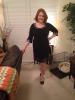
Had my surgery 8/14/13 and was 248. I weighed yesterday and I was 197.2! I was stuck at 206 through the holidays (didn't eat as well as I should have). As soon as I got back on plan the weight started falling off again. I'm down from a tight size 18 to a loose 14 in pants and from a 2x to an xl top (I'm a little busty). I'm so happy, feel great physically, and feel sexy again. You can do it people!

  • Replies 5
  • Views 898
  • Created
  • Last Reply

Top Posters In This Topic

Most Popular Posts

Posted Images

Featured Replies

  • Author

post-179044-0-46817500-1389448651_thumb.jpg

My lbd.

Congrates!! Love the dress. Great job! :)

You look great! Love the dress!

Ps

I think I have a blanket that looks like the one on your couch!

Congratulations! Feels good, doesn't it?

Wow! You look fabulous! Congratulations! :)

Join the conversation

You can post as a guest; create a free account to track replies, follow topics, and be part of the largest weight loss surgery community.

Join the conversation

You can post now and register later. If you have an account, sign in now to post with your account.

Guest
Reply to this topic...

Account

Navigation

Search

Search

Configure browser push notifications

Chrome (Android)
  1. Tap the lock icon next to the address bar.
  2. Tap Permissions → Notifications.
  3. Adjust your preference.
Chrome (Desktop)
  1. Click the padlock icon in the address bar.
  2. Select Site settings.
  3. Find Notifications and adjust your preference.