Skip to content
View in the app

A better way to browse. Learn more.

BariatricPal

A full-screen app on your home screen with push notifications, badges and more.

To install this app on iOS and iPadOS
  1. Tap the Share icon in Safari
  2. Scroll the menu and tap Add to Home Screen.
  3. Tap Add in the top-right corner.
To install this app on Android
  1. Tap the 3-dot menu (⋮) in the top-right corner of the browser.
  2. Tap Add to Home screen or Install app.
  3. Confirm by tapping Install.

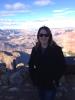
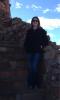
Comparison pic!

I was looking through my camera and found a pic of me last Christmas. I knew I was overweight but seeing how round my face was is shocking! I guess I was in denial when I would look in the mirror! I had my sleeve on August 12th. Feeling so much better!!

post-177271-0-40267700-1387688290_thumb.jpg

post-177271-0-06140900-1387688334_thumb.jpg

post-177271-0-32529700-1387688360_thumb.jpg

post-177271-0-38039900-1387688371_thumb.jpg

  • Replies 9
  • Views 1.1k
  • Created
  • Last Reply

Featured Replies

Look so good.and I love your smile this season. U did great. Happy holidays.

Great job!

I love how in your afters you look so much taller :) it's because you are long n lean.

Congrats!
What a nice Christmas give to you!!

Looking good!!!!

Looking good, especially since you aren't wearing that Cowboys jacket in the new pictures ;)

Archived

This topic is now archived and is closed to further replies.

Trending Products

PatchAid Vitamin Patches

Account

Navigation

Search

Search

Configure browser push notifications

Chrome (Android)
  1. Tap the lock icon next to the address bar.
  2. Tap Permissions → Notifications.
  3. Adjust your preference.
Chrome (Desktop)
  1. Click the padlock icon in the address bar.
  2. Select Site settings.
  3. Find Notifications and adjust your preference.