




before and after
- Replies 43
- Views 6.3k
- Created
- Last Reply
Top Posters In This Topic
-
williamrjomes2 6 posts
-
belunos 2 posts
-
J.Diesel 2 posts
-
magtart 1 post




Most Popular Posts
-
Thank you. Energy wise I feel great. I have tons of energy. Before surgery all I wanted to do is lay down n take naps. Now I just wanna move and do things. This surgery has changed my life.
-
I love how the baby items have progressed with your weight loss. From bouncer to baby gate. You're little one will never know the old you, they'll only know you as healthy and full of energy. Congr
-
welllllllll my goodness, aren't you handsome! LOL. congrats!! very well done. You look incredible! ETA: Also just noticed how you lined your body up with the wall. Not that your weight loss wasn't


Posted Images
Featured Replies
Join the conversation
You can post as a guest; create a free account to track replies, follow topics, and be part of the largest weight loss surgery community.
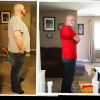
Surgery date January 7 2013. Weight 392 at surgery in grey shirt. Weight as of today 252lbs. Total weight loss is 140lbs.
[ATTACH]18057[/ATTACH]
[ATTACH]18057[/ATTACH]