Skip to content
View in the app

A better way to browse. Learn more.

BariatricPal

A full-screen app on your home screen with push notifications, badges and more.

To install this app on iOS and iPadOS
  1. Tap the Share icon in Safari
  2. Scroll the menu and tap Add to Home Screen.
  3. Tap Add in the top-right corner.
To install this app on Android
  1. Tap the 3-dot menu (⋮) in the top-right corner of the browser.
  2. Tap Add to Home screen or Install app.
  3. Confirm by tapping Install.

After

  • Replies 10
  • Views 1.3k
  • Created
  • Last Reply

Top Posters In This Topic

Posted Images

Featured Replies

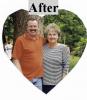
Wow- you look phenominal- and I must also comment on the fact that your husband is grinning from ear to ear with the hottie on his arm!

Debra... you look awesome! WTG!!!

Darcy

  • Author

Thanks so much for all the helpful comments. I have never been called a "hottie". That works for me. One of my biggest battles is overcoming my mental image of myself. I get in booths and go through passageways that I used to would have used a tire tool to get my big self through. It still amazes me. Has anyone else experienced this yet? I'm sure it gets more natural as time goes by. It has been 10 months for me.:)

Join the conversation

You can post now and register later. If you have an account, sign in now to post with your account.

Guest
Reply to this topic...

Trending Products

PatchAid Vitamin Patches

Account

Navigation

Search

Search

Configure browser push notifications

Chrome (Android)
  1. Tap the lock icon next to the address bar.
  2. Tap Permissions → Notifications.
  3. Adjust your preference.
Chrome (Desktop)
  1. Click the padlock icon in the address bar.
  2. Select Site settings.
  3. Find Notifications and adjust your preference.