Skip to content
View in the app

A better way to browse. Learn more.

BariatricPal

A full-screen app on your home screen with push notifications, badges and more.

To install this app on iOS and iPadOS
  1. Tap the Share icon in Safari
  2. Scroll the menu and tap Add to Home Screen.
  3. Tap Add in the top-right corner.
To install this app on Android
  1. Tap the 3-dot menu (⋮) in the top-right corner of the browser.
  2. Tap Add to Home screen or Install app.
  3. Confirm by tapping Install.

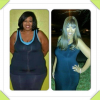
92 Pounds Gone!

  • Popular Post

Almost 8 months out and 92 pounds gone. Yep I am excited :)

[ATTACH]9993[/ATTACH]

post-33295-13813663601946_thumb.png

  • Replies 27
  • Views 2.5k
  • Created
  • Last Reply

Featured Replies

Good luck to you all!!

You look great!! Keep up the good work! My surgery is March 6, 2013 and I'm nervous and excited!

You look fantastic ! Thanks for motivating me . I get sleeved next Wednesday 3-6-13 .

Thank you guys!! I am 5'8 and my starting weight was 327.8. I have had 4 c sections so I am not pleased with my belly but I didn't carry the majority ofweight there. I was all hips and booty lol. My arms are a little jiggly but nothing I can't live with. I am about 50 pounds from goal so I have already contacted a trainer to help me with some toning in addition to what I am doing. Hope that helps :)

Did you work out at all?

You look damn good ..!! I'm 5'8 I started at 290 im 6weeks out Monday I'm down to 250 I hope to have a success as you .. You look amazing

  • Author

@nbkeva2 I walk and lift weights. I also have a stationary bike I ride occasionally.

Wow - you look amazing! Congratulations!

Congrats you look awesome...keep it up.....you are definitely an inspiration.

Archived

This topic is now archived and is closed to further replies.

Trending Products

PatchAid Vitamin Patches

Account

Navigation

Search

Search

Configure browser push notifications

Chrome (Android)
  1. Tap the lock icon next to the address bar.
  2. Tap Permissions → Notifications.
  3. Adjust your preference.
Chrome (Desktop)
  1. Click the padlock icon in the address bar.
  2. Select Site settings.
  3. Find Notifications and adjust your preference.