




January Newbies ! Progress ?
- Replies 378
- Views 32k
- Created
- Last Reply
Top Posters In This Topic
-
ebonisekim 25 posts
-
VSG_me 18 posts
-
mizzzliza 17 posts
-
fonally 17 posts




Most Popular Posts
-
I was sleeved on New Year's Eve! Yes I was in the hospital instead of partying but what I great way to start a new year. I am now 3 weeks post op and I feel A LOT better than the first 2 weeks. Ugh, t
-
I was sleeved January 22. I've had an amazing recovery and have had no problems whatsoever. I currently am able to get in 60 ounces of fluid on a regular basis and between 60 and 90 g of protein daily
-
I was sleeved on January 14. Starting weight was 277 and weight today is 255. I don't understand what all the "confessions" are about? Why is it not okay to eat a snickers every once in a while or hav


Posted Images



Featured Replies
Join the conversation
You can post as a guest; create a free account to track replies, follow topics, and be part of the largest weight loss surgery community.
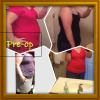
I was sleeved January 5th . Starting weight 201 and down to 185 any other peeps proud of their progress?