Skip to content
View in the app

A better way to browse. Learn more.

BariatricPal

A full-screen app on your home screen with push notifications, badges and more.

To install this app on iOS and iPadOS
  1. Tap the Share icon in Safari
  2. Scroll the menu and tap Add to Home Screen.
  3. Tap Add in the top-right corner.
To install this app on Android
  1. Tap the 3-dot menu (⋮) in the top-right corner of the browser.
  2. Tap Add to Home screen or Install app.
  3. Confirm by tapping Install.
  • Appearance

Join BariatricPal free

  • Ask your own questions
  • Reply and follow topics
  • Message other members
  • No cost, no spam

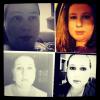
One Month Post-Op Photo

So, someone suggested sharing photos somewhere other than on Instagram but I've been very hesitant. But I put together a one month "collage" to see if I could see the difference from Week 1 (10/25) to Week 4 (11/22-exactly four weeks after surgery) and this is what I came up with.

post-44296-13813661080662_thumb.jpg

  • Replies 4
  • Views 775
  • Created
  • Last Reply

Top Posters In This Topic

Posted Images

Featured Replies

OneWritersSoul -- it is clearly obvious that you are doing something righ! You look great!

ROCK ON, GIRL!

By the way, I have always thought that the photo you use is so mysterious yet beautiful. Now I see that you're a writer as well, which only adds to the mystery! Way cool.

  • Author
By the way' date=' I have always thought that the photo you use is so mysterious yet beautiful. Now I see that you're a writer as well, which only adds to the mystery! Way cool.[/quote']

Thank you very much for the kind and encouraging words! You've made my day and made me smile, Sissy Kay!

What a great idea! I love seeing the gentle transformation over such a short period of time. You must be so excited. Keep up the wonderful work and ENJOY!

Join the conversation

You can post as a guest; create a free account to track replies, follow topics, and be part of the largest weight loss surgery community.

Join the conversation

You can post now and register later. If you have an account, sign in now to post with your account.

Guest
Reply to this topic...

Account

Navigation

Search

Search

Configure browser push notifications

Chrome (Android)
  1. Tap the lock icon next to the address bar.
  2. Tap Permissions → Notifications.
  3. Adjust your preference.
Chrome (Desktop)
  1. Click the padlock icon in the address bar.
  2. Select Site settings.
  3. Find Notifications and adjust your preference.