Skip to content
View in the app

A better way to browse. Learn more.

BariatricPal

A full-screen app on your home screen with push notifications, badges and more.

To install this app on iOS and iPadOS
  1. Tap the Share icon in Safari
  2. Scroll the menu and tap Add to Home Screen.
  3. Tap Add in the top-right corner.
To install this app on Android
  1. Tap the 3-dot menu (⋮) in the top-right corner of the browser.
  2. Tap Add to Home screen or Install app.
  3. Confirm by tapping Install.

Virtual Model -Fun

Someone shared this link on a VSG FB page and I thought I'd share it. It looks pretty cool to mess around with it. Didn't seem to realistic, because the models look so perfect, but it gives you a general idea of your body shape if you were at certain sizes. It's pretty fun to play around with. Hope you like it!

http://corpo.mvm.com/en/shopping/weightloss.php

  • Replies 12
  • Views 1.8k
  • Created
  • Last Reply

Top Posters In This Topic

Most Popular Posts

  • <snort> seriously. Maybe the model needs to have a few pregnancies and some stretch marks thrown in.

  • CowgirlJane
    CowgirlJane

    I looked alot worse at 308 then their model does...

  • Anamor2011
    Anamor2011

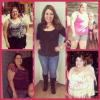
    Here are my models! hehe

Featured Replies

Thanks... this was a great way to visualize

I looked alot worse at 308 then their model does... :wacko:

I look worse than the model as well. I hope that my skin tightens so it isn't too hanging. I am following all the tips to help

  • Author

sorry error

I love that site!! :)

  • Author

Here are my models! hehe

PreSurgery 250 lbs

Current Weight 161 lbs

Goal weight of 130 lbs

that is awesome!

Those models kill me. I used to muse -- If at my real life goal weight, I could look half as good as my current weight model looks, I'd be tickled pink.

That's a neat site. Wish my skin was that tight looking and cellulite free!! Lol Fun to play around with though.

keepin it real ;)

Join the conversation

You can post now and register later. If you have an account, sign in now to post with your account.

Guest
Reply to this topic...

Trending Products

PatchAid Vitamin Patches

Account

Navigation

Search

Search

Configure browser push notifications

Chrome (Android)
  1. Tap the lock icon next to the address bar.
  2. Tap Permissions → Notifications.
  3. Adjust your preference.
Chrome (Desktop)
  1. Click the padlock icon in the address bar.
  2. Select Site settings.
  3. Find Notifications and adjust your preference.