Skip to content
View in the app

A better way to browse. Learn more.

BariatricPal

A full-screen app on your home screen with push notifications, badges and more.

To install this app on iOS and iPadOS
  1. Tap the Share icon in Safari
  2. Scroll the menu and tap Add to Home Screen.
  3. Tap Add in the top-right corner.
To install this app on Android
  1. Tap the 3-dot menu (⋮) in the top-right corner of the browser.
  2. Tap Add to Home screen or Install app.
  3. Confirm by tapping Install.
  • Appearance

Join BariatricPal free

  • Ask your own questions
  • Reply and follow topics
  • Message other members
  • No cost, no spam

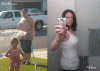
At my goal w/pix

So I am now beyond my weight goal. I wanted to stop at 160 due to my build and stuff but now I'm bouncing between 157 - 159. I posted this on my facebook page but figured I should post the pix here as well for everyone who's on the fence about the surgery. Take a look and tell me this surgery isn't the greatest thing on earth.

post-5158-13813657195884_thumb.gif

  • Replies 30
  • Views 3.4k
  • Created
  • Last Reply

Top Posters In This Topic

Posted Images

Featured Replies

Wow what a difference! Pat yourself on the back. You look wonderful!

Khy

What a difference. You look GREAT!!! :) Congrats!

You look so amazing!!!!! Can't wait till I'm there. :)

Deb

What a great before/after comparison! You look amazing!!! Congrats!

Congratulations! You look fantastic and I'm sure your little girl is very proud of her mama!

Congrats, Leslie you look fabulous! I am so happy for you.

WOW! That is so amazing. You look so tiny and such a difference from the before pic. Proud of you.

O.M.G!!!

What a fantastic transformation.... congratulations on reaching goal and losing another PERSON!!! You are definately half the woman you used to be! Very inspiring and a reminder that, I too can make goal!!

You look fantastic!

Join the conversation

You can post as a guest; create a free account to track replies, follow topics, and be part of the largest weight loss surgery community.

Join the conversation

You can post now and register later. If you have an account, sign in now to post with your account.

Guest
Reply to this topic...

Account

Navigation

Search

Search

Configure browser push notifications

Chrome (Android)
  1. Tap the lock icon next to the address bar.
  2. Tap Permissions → Notifications.
  3. Adjust your preference.
Chrome (Desktop)
  1. Click the padlock icon in the address bar.
  2. Select Site settings.
  3. Find Notifications and adjust your preference.