Skip to content
View in the app

A better way to browse. Learn more.

BariatricPal

A full-screen app on your home screen with push notifications, badges and more.

To install this app on iOS and iPadOS
  1. Tap the Share icon in Safari
  2. Scroll the menu and tap Add to Home Screen.
  3. Tap Add in the top-right corner.
To install this app on Android
  1. Tap the 3-dot menu (⋮) in the top-right corner of the browser.
  2. Tap Add to Home screen or Install app.
  3. Confirm by tapping Install.

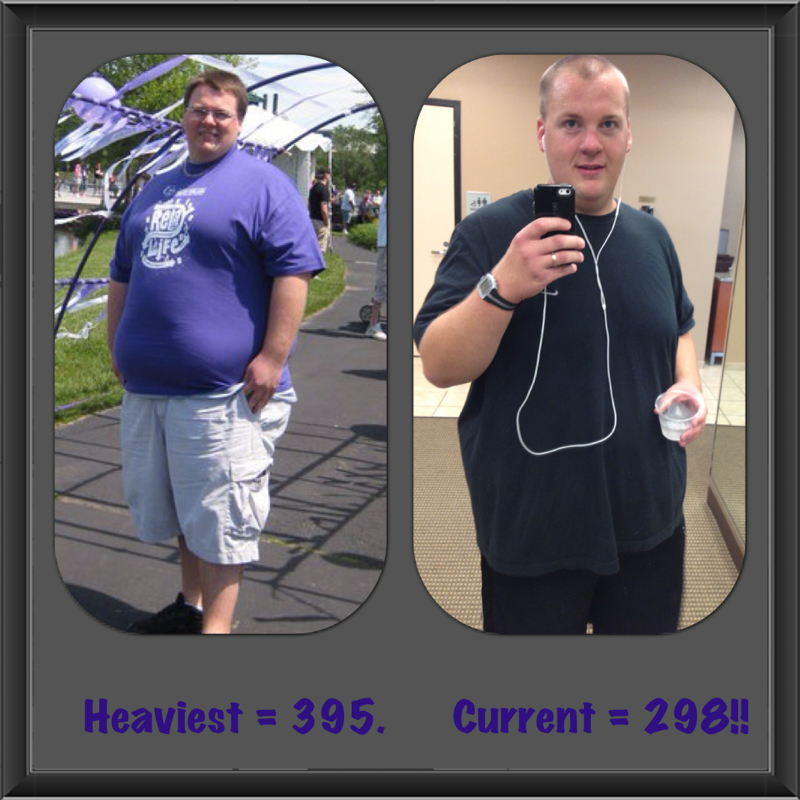
Finally under 300!!!!

post-211390-13813135306662_thumb.jpg

post-347899-13813142164531_thumb.jpg

  • Replies 22
  • Views 2.2k
  • Created
  • Last Reply

Featured Replies

Congrats, you look great!!

wow WTG your look fabulous and what a feeling to get under that first group of numbers...

  • Author

Thanks everyone!! I was 333 on my surgery day (may 6th). 369 in February when I called and setup my consultation. This picture (395) was before I lost 80 pounds on my own only to gain most of it back before deciding to have WLS!

Congratulations!!!!!!!

Congratulations you look great!!

You look great!! Congrats!!

Awesome job. You look happy! I love it!

Congratulations! Great job!!

That is outstanding what an insperation you are , thanks for sharing that with us ! :)

Love to watch your progress! Congrats my friend.

Congrats Creekwood! Keep making the May Bandsters proud.

Great job! You look good I just had my surgery july 30th I'm looking forward to my new beginning

post-347899-13813142164531_thumb.jpg

you are just so lucky i am in lust for sammy (the redrocker) hagar formerly lead singer of van halen......all i am saying BF :)

i am sooooooooooooo proud of you stud muffin.......way to go honey....way to go

congratulations-buddy.gif

Archived

This topic is now archived and is closed to further replies.

Trending Products

PatchAid Vitamin Patches

Account

Navigation

Search

Search

Configure browser push notifications

Chrome (Android)
  1. Tap the lock icon next to the address bar.
  2. Tap Permissions → Notifications.
  3. Adjust your preference.
Chrome (Desktop)
  1. Click the padlock icon in the address bar.
  2. Select Site settings.
  3. Find Notifications and adjust your preference.