




Nsv - Surgeon Didn't Recognise Me!
- Replies 4
- Views 1.1k
- Created
- Last Reply
Top Posters In This Topic
-
kll724 1 post
-
Jenn1214 1 post
-
phatkatblue 1 post
-
dhales 1 post



Popular Days
Featured Replies
Join the conversation
You can post as a guest; create a free account to track replies, follow topics, and be part of the largest weight loss surgery community.
I saw my surgeon for a follow up and fill tonight. I was the only one in the waiting room when he came out and called me name, then looked around for me. "Oh, I didn't recognise you!" he said, "You look great!"
Needless to say I was pretty pumped by that, but then he mentioned his information seminars and said I would be a model patient to speak at them.
And then when I went out to reception, his receptionist pointed out that he hadn't recognised me!
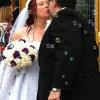
He also remembered that I had my son's wedding and was pleased that I had brought photos in to show him. (I've tried to attach a pic, so hope that it works.)
Only small negative of the appointment was that my port may have partially flipped. He was able to get the fill in (two jabs, ouch!) but warned that it may flip completely, even though it was both stitched and mechanically attached. Fingers crossed that doesn't happen!