paladin
LAP-BAND Patients
-
Joined
-
Last visited
-
No wonder I get that temporary high after Starbucks. I had no idea that the sugars, carbs, & calories were that high. Scary is an understatement. Thanks for the link.
-
Just may have to pop in there sometime. I don't think Tulsa is too far from OKC. I'll put it to a yahoo map and check it out. Thanks and enjoy your cruise. It sounds like fun.
-
:pound: Can't say I've seen the fox squirrel, but have seen a flying squirrel. It wasn't eating cheese at the time. I wouldn't put it past a squirrel to eat cheese.
-
FOXNews.com - Man Must Pay Partnered Ex-Wife Alimony - Local News | News Articles | National News | US News A man in CA wants his alimony payments to stop b/c his ex-wife has entered into a legal domestic partnership with another woman. Well, a CA judge has ruled for the man to keep paying. I thought same sex marriage was legal in CA. Perhaps I'm wrong. If you consider same sex marriage legal, shouldn't you take the responsibility that goes along with it and be financially responsible for the relationship? So what do you think? Should he still have to pay or should this man be able to stop alimony payments?
-
It's human nature to have hope and these stupid scams play upon those emotions. "Maybe that could be me" or "I could just try it". That is what the advertisers are counting on. I have to admit that I have pondered some of those scams including the ones where you can make thousands in a couple short days. Reality sinks in pretty quick. For some, reality one hits after the credit card has been charged. :phanvan We also live in a society that has become one of expecting fast results whether it be fast food, JIT (Just In Time) production factories, weight loss, etc. We, as in the general public, have become accustomed to instant satisfaction without having to work for it. Sad but true.
-
We live in OK and the mosquitoes here are big enough to carry away a small child. The best thing we have used to date is Bull Frog found at Wal-Mart. They can't keep it in stock. It also provides sun protection. Mosquitoes are evil.....just evil!!
-
:pound: Three Arkansas surgeons were playing golf together and discussing surgeries they had performed. One of them said, I'm the best surgeon in Arkansas. In my favorite case, a concert pianist lost seven fingers in an accident, I reattached them, and 8 months later he performed a private concert for the Queen of England. The second surgeon said. That's nothing. A young man lost an arm and both legs in an accident, I reattached them, and 2 years later he won a gold medal in track and field events in the Olympics. The third surgeon said, you guys are amateurs. Several years ago a woman was high on cocaine and marijuana and she rode a horse head-on into a train traveling 80 miles an hour. All I had left to work with was the woman's blonde hair and the horse's ass. I was able to put them together and now she's running for President.
-
<p><p><p>IMO it sounds like your friend may be afraid of your success. After all, if you can get the band and lose weight, it may lessen how she feels about herself (for whatever reason). Jealously is a very strong emotion. Just something to think about. </p> <p> </p> <p>In addition, there are complications of getting in your car and driving every day. <img src="http://www.LapBandTalk.com/images/smilies/loco.gif" border="0" alt="" title="Loco" smilieid="272" class="inlineimg" /> Hang in there and stay focused on you and not what others have to say. <img src="http://www.LapBandTalk.com/images/smilies/hug.gif" border="0" alt="" title="Hug" smilieid="260" class="inlineimg" /><img src="http://www.LapBandTalk.com/images/smilies/loco.gif" border="0" alt="" title="Loco" smilieid="272" class="inlineimg"
-
Hi Kim ~ How ya'll doing over your way? I guess when you grow up with parents that say tager instead of tiger and tare instead of tire, ya'll is just part of life. Hey, have you ever been to a doins'? That's what we call a potluck. :biggrin1: Holy cow girl....a BMI under 30?!! I bet it feels so good. We are very proud of you and the hard work you've out into yourself. Overweight sounds so much better than obese. Where oh where is Myra.....and the others?
-
Now the squirrels in Florida are a little different......

-
You know, the band would be much more successful if they could install a band on your brain at the same time.....at least that's what my wife told her surgeon. It's true. I don't believe that old habits are broken, they are just replaced with different habits. This will be a process for you that won't be magically fixed by a surgery. It takes work. Take baby steps and become a sponge to soak up all the info you can. Knowledge is power. You can and WILL be successful. Keep asking questions and remember: "If you always do what you've always done, then you'll always get what you've always got." BTW, a PB is a productive burp. Here's a great link with many other abbreviations: http://www.lapbandtalk.com/f73/abbreviations-what-they-mean-7959/.
-
Howdy from OK. We are recent transplants. My DW had her lapband surgery last May in IN and I'm considering it. I say "considering" it b/c I'm watching her progress. :cry We were wondering if Dr. Keith does fills for other patients if we have her file transferred from IN. Both facilities are "Centers of Excellence". Actually my wife needs a slight unfill. It's difficult for her to get hard Proteins down. :phanvan She's only had 2 fills total without complications. Any info on Dr. Keith would be greatly appreciated. BTW, is there a group meeting in the OKC area?
-
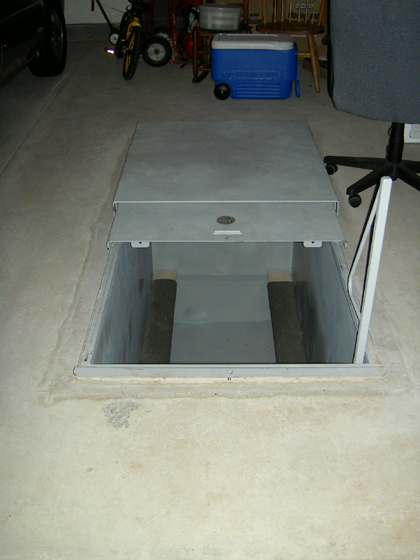
Well, we ended up with a storm shelter. Glad to have it and hope we never have to use it. We are going to let the boys finger paint in it and allow them to enter the shelter if we're in the garage just so it's "somewhat" familiar to them. The guy that sold us the shelter said he allowed his kids to become acclimated to it in the event they need to use it. To be honest, I think we should have built an ark instead of a storm shelter. :rain: Who knew OK would get so much rain?
-
Long time, no talk friends. Let me rephrase to say SKINNY friends. Just reading your updates make me smile. Myra, so sorry your having so much trouble. Big hugs & prayers to you! Well, we are pretty much settled in OK and we are loving it. Can't say we are much thinner b/c it's been hard to eat right when surrounded by moving boxes. 3Loves had a fill before we left IN and she needs an unfill. Can't seem to get hard Proteins down and living off of things that are band friendly yet not so healthy. Well, I'm off to do some more reading to catch up on things. Coming to this thread is like coming home. I miss ya'll.....as they say here in OK.
-
My favorite thread of all time!! It's been awhile. Can't remember if this one has been posted yet & don't want to take the time to look. Pretty good thread killer if you ask me. I know, you didn't ask. :car: Did I hear someone say cheese? Sounds a little pcrazy to me. Did you know that when you cut the cheese after eating cheese that all cheese is not created equal? This is a classic: http://www.720ice.com/pdf/BabypowderFart.mpg