





lunnah
Pre Op
-
Joined
-
Last visited
Everything posted by lunnah
-
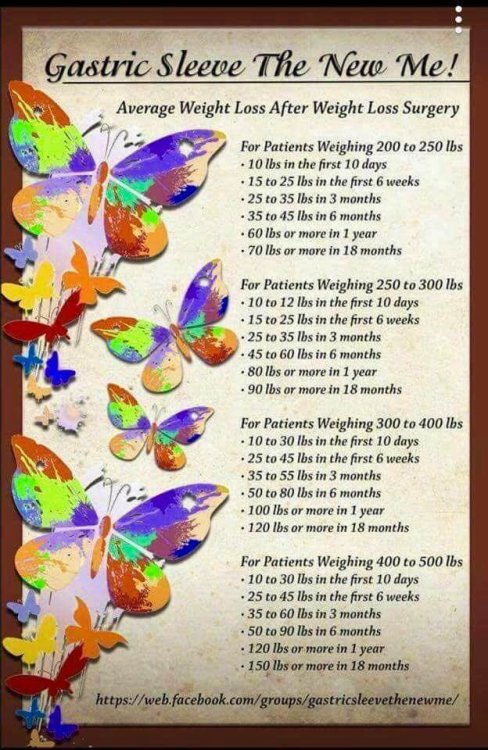
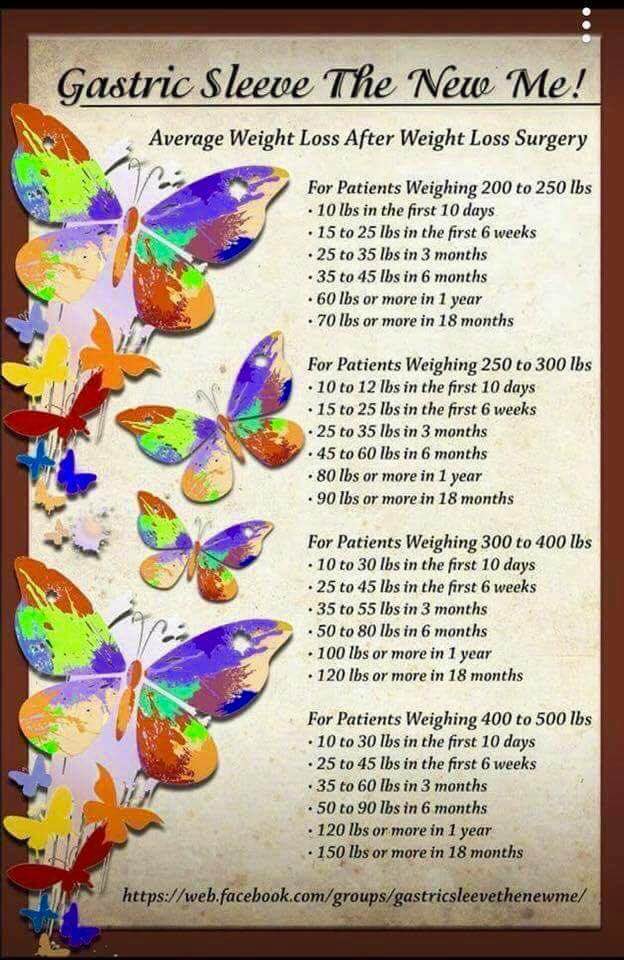
I found this interesting, remember people are different this is just an average
-
2 years out, best decision I made well worth it.
-
True
-
True
-
I was 260 now I am 153
-
Remember that the sleeve can always be revised to the bypass but not the other way around. I had the sleeve 2 years ago eliminated 100lbs and think was the best decision I made.
-
I still take them SW 250 CW 155 GW 155 Sleeved August 17, 2016
-
One more pound to my goal yeah SW 250 CW 161 GW 160 Sleeved August 17, 2016
-
Update 1 year out SW 250 CW 166 GW 160 Sleeved August 17, 2016
-
If it works for you, why not? SW 250 CW 166 GW 160 Sleeved August 17, 2016
-
I had to take mine to be biopsed lol so I actually had it for half a day, what was taken out and I did take a picture, maybe I am weird too lol SW 250 CW 168 GW 160 Sleeved August 17, 2016Thank you all, i still have a ways to go but I will get there in no time. This site is full of information and wonderful people and that sure helps. SW 250 CW 174 GW 160 Sleeved August 17, 2016Thank you SW 250What did you hear? SW 2509 months out, Sw 250 CW174 Gw160 Surgery date August 2016Looking for reviews on this product. Has anyone here used it? SW 250 CW176 Gw 160How long did you wait to get them done? Sent from my iPhone Hw 260 Sw 255 Cw 186 GW 160 Sleeved August 17, 2016How long one need to wait after VGS to have reparative surgery (plastic surgery) Sent from my iPhone Hw 260 Sw 255 Cw 186 GW 160 Sleeved August 17, 2016Nice, thank you for posting it Sent from my iPhone Hw 260 Sw 255 Cw 201 Sleeved August 17, 2016On my Iphone is the same name, I love this app you can also add measurements Sent from my iPhone Hw 260 Sw 255 Cw 201 Sleeved August 17, 2016I will look for it, thanks Sent from my iPhone Hw 260 Sw 255 Cw 201 Sleeved August 17, 2016Sent from my iPhone Hw 260 Sw 255 Cw 201 Sleeved August 17, 2016

Account
Navigation
Search
Configure browser push notifications
Chrome (Android)
- Tap the lock icon next to the address bar.
- Tap Permissions → Notifications.
- Adjust your preference.
Chrome (Desktop)
- Click the padlock icon in the address bar.
- Select Site settings.
- Find Notifications and adjust your preference.
Safari (iOS 16.4+)
- Ensure the site is installed via Add to Home Screen.
- Open Settings App → Notifications.
- Find your app name and adjust your preference.
Safari (macOS)
- Go to Safari → Preferences.
- Click the Websites tab.
- Select Notifications in the sidebar.
- Find this website and adjust your preference.
Edge (Android)
- Tap the lock icon next to the address bar.
- Tap Permissions.
- Find Notifications and adjust your preference.
Edge (Desktop)
- Click the padlock icon in the address bar.
- Click Permissions for this site.
- Find Notifications and adjust your preference.
Firefox (Android)
- Go to Settings → Site permissions.
- Tap Notifications.
- Find this site in the list and adjust your preference.
Firefox (Desktop)
- Open Firefox Settings.
- Search for Notifications.
- Find this site in the list and adjust your preference.