Mel7
LAP-BAND Patients
-
Joined
-
Last visited
Everything posted by Mel7
-
Sleep tight lovie!
-
And thanks for your wishes Rijanasolll! Xx
-
Good luck Carvinplayer! I'll think of you tomorrow. We can do this thing!
-
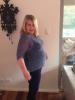
Good luck nay91 and thanks to you all for your thoughts and advice. Here's to being skinny at last. I've tried to attach an unfortunate before pic. Hope it worked!
-
Thanks girls! I'll let you know how I go. Xx
-
Thanks for your advice and support! Does it hurt much?
-
I'm excited. Bit scared. What should I take to hospital? Xx
-
I'm on the 29th too! About to start the preop diet. How are you doing?
-
You look amazing!
-
What are you allowed to eat?
-
I'm 29 October!
-
I'm north too. 29 October is my date. Have you started the preop diet yet?
-
I'm nervous! I'm in Australia, and we pretty much get approved if the surgeon recommends it . Nervous about procedure, recovery, telling people. Can't wait to lose weight tho! How are you feeling about it?
-
We're all close in dates. Good luck to you both. See you here!
-
Good to make contact. Have you started preop diet?
-
Best of luck. Getting close now!
-
Very excited, but loathing the pre op diet. Any good alternatives to Optifast? It makes me wanna puke. All of it!