bmbrush413
LAP-BAND Patients
-
Joined
-
Last visited
-
-
-
-
-
-
-
-
-
-
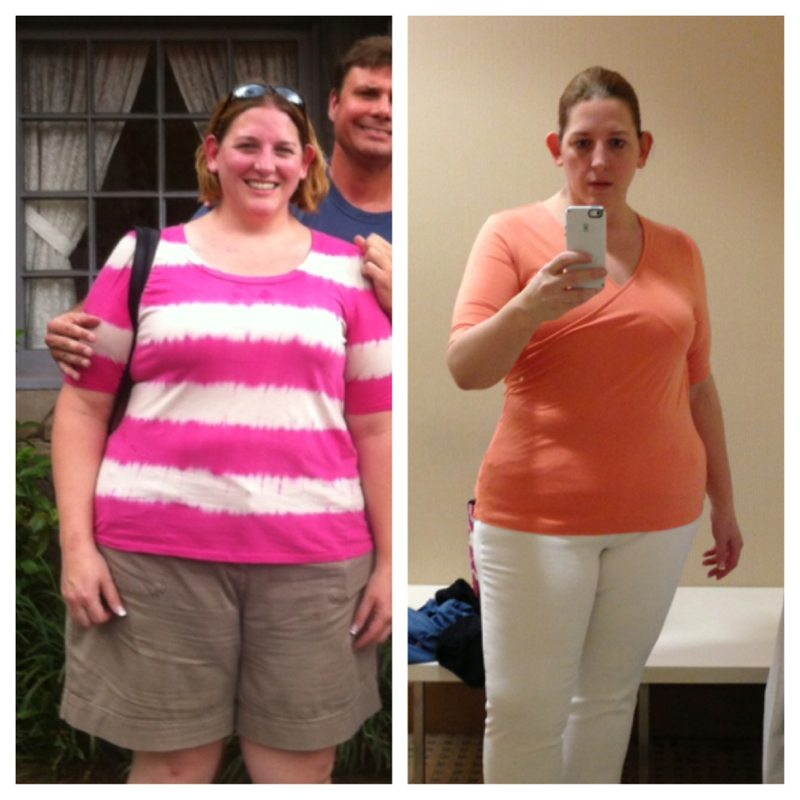
Left: June of 2011 @ my highest (308) Right: June of 2013 @ about 240 (a little less than 3 months post op)
-
July 2012 - June 2013 (almost 3 mos. post op)

-
-
-
I was 6 weeks...
-
-
Feeling awesome!! If you're in those first couple of weeks post-op, just know it gets better and it's totally worth it!!

-
BJs Bariatrics sells a mix and match sample pack. Reasonable price and quick shipping. The Syntrax Nectar fruity/juice type drinks saved me my first couple of weeks post op. 16 oz of water and ice in a Blender Bottle - awesomeness!!
-
Syntrax nectar saved my life in my first few weeks post-op! Here are my faves: Vanilla Bean Torte chocolate Truffle Double Stuffed Cookie (like liquid Oreos...yum!) Fuzzy Navel* Roadside Lemonade* Lemon Tea* Twisted Cherry* (reminds me of Jello before it sets) Cappuccino or latte (can't remember which it is) strawberry Kiwi* Strawberry Mousse The ones I put the star next to are the "juice" type ones. I mixed them with 16 oz of Water and some ice and they were awesome. A really good break from the more milk-based heavier ones. I ordered mine from BJs Bariatrics. I can't remember how much they were, but it was a mix and match sample pack and they shipped super fast. Good luck!
-
-
Same here... Used milk of magnesia 2 nights in a row, and now take Miralax every night to keep things going. This was never a problem for me before.
-
I'm a little over 2 months out and my stomach is still noisy....seems typical.
-
Eggs can be tough for a lot of people - they weren't on my approved list until 6 weeks out. Also, keep in mind that just because it's on the list doesn't mean it will work for you. I'm having a really hard time with chicken right now...but turkey goes down okay. Foamies are the worst...feel better!
-
I had that for the first few weeks - definitely ketosis. It's awful. I'm past that now - getting more calories in - but I still can't drink plain water. Thank goodness for SoBe Life Water Zero and Vitamin Water Zero!!
-
I had issues with some of the protein shakes I was drinking...wound up with some lactose intolerance that I never had before. Maybe that's part of it? Plus - liquid in equals liquid out for a while, too...
-
I had no problem with my Nexium right from day 1...
-
:D
-
I use My Fitness Pal to track everything - lots of us here are on there. If you join up you can friend me - losingitlittlebylittle is my username there!
-
I went from Nexium to Dexilant - and also on Carafate 4x a day. It's been two and a half weeks and still not as good as I was. It's kind of depressing to look at a fridge full if stuff and/or a menu at a restaurant and struggle to find something to eat. Hopefully it will improve - thanks for the good wishes!