





0ldM3By3
LAP-BAND Patients
-
Joined
-
Last visited
-
-
-
-
-
-
-
-
-
-
-
-
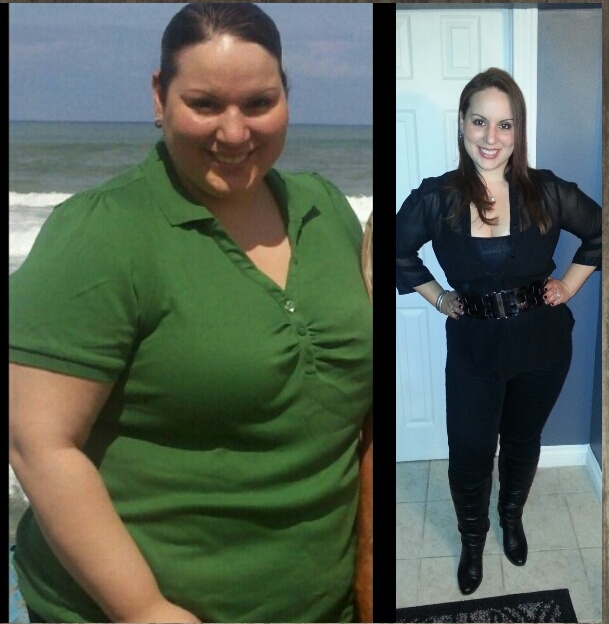
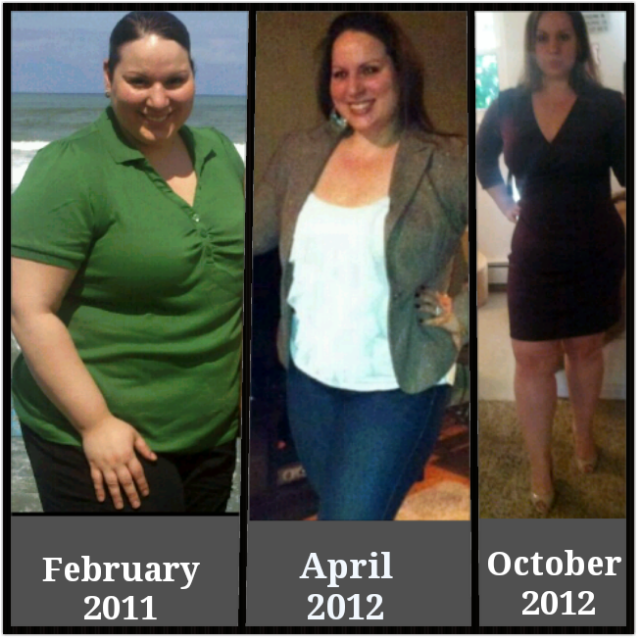
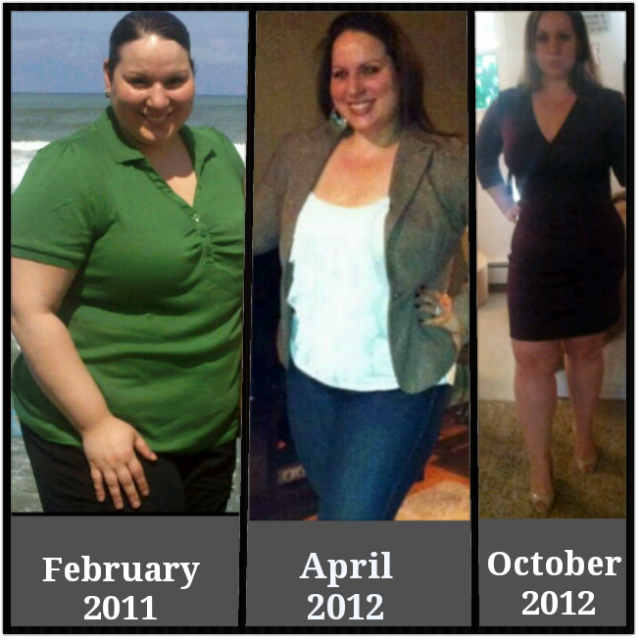
Finallyyyyyy, after 6 months after this gosh darn post, I lost those 25 pounds I wanted and I am now in "onderland." I started at 274 in November 2011. I am officially 197. 77 pounds down. 35 more till my goal! How cool it would be if I can make my goal by my wedding in November for my 2 year band-aversary. I'll keep ya posted!
-
Oh you poor thing! It gets better! Unfortunately, all those painful experiences are great teachers... lol On thing that really helps me eat slower is I take one bite (not a big bite either), put my fork down, slide my plate away, chew untill the food is litterally the consistency of watery mashed potatoes (this sometimes takes about a whole minute....crazyyyy I know), and then take my next bite. During this process, I do NOT drink while I eat. In other words, it takes me about 45 minutes to eat. I was banded November 2011 and it took me a longgggg time to get to a semi-decent routine. Best wishes. It gets easier and the results make it worth it!
-
-
-
I was banded 11/16/11. I got engaged 5/19/12 with a size 9 engagement ring. Since my surgery, I've lost 77 pounds. Last week while washing dishes (with my ring on like an idiot), my ring flew off, and down the drain!!!!! Luckily, my fiance was able to open the drain and get my ring before it was gone for good. The next day, I brought my ring to the jeweler to get resized. I am now a size 6 1/2!!!!!!! I haven't been that ring size since I was in my mother's womb I think. A little success story from a little scare...
-
-
If you asked me 14 months ago if I would be fitting in a size 10 wedding dress that I will need alterations on to make it smaller, I'd laugh at you in my size 22 and say NEVER! Today, 76 pounds down, thats exactly what happened. I've never felt more beautiful on the outside then right now. Nine more months untill I marry the man who has loved me for BIGGER or SMALLER the last 13 years. I'm just so excited that I had to post! [ATTACH]25810[/ATTACH]
 Update: Down 2.8 pounds this week. :-)Thatsssss awesome!!! Ahhhhhh. I can't wait till onederland!!Name, real or screen~ MsMirandaK Goal weight for October 29th~ 209 Weight on October 1st~ 219 Age~ 27 Dietary goal for October~ get in my protein and water daily Exercise goal for October~ workout 4 days a week for an hour Personal goal for October~ DON'T EAT THE HALLOWEEN CANDY!! LOL Date banded~ November 16, 2011 Total weight loss since banding/pre op diet~ 54 pounds What is your favorite Halloween Activity?~ Unfortunately, eating the candy.... but this year maybe finally attending a haloween party where i fit in a costume other than a fat pumpkin or whale.Aww... the "d" word passes! It gets better! When I feel down, I hop on this site for a boost! Best wishes! You will love being banded sooner than you think! XoxoI see a difference and am greatful, but why so slowwwww. :'( [ATTACH]24892[/ATTACH]
 Girllllllll... you look great!!! Keep it up! I am only down 51 pounds and I'm feeling discouraged too! Congrats!!Slow progress... I'm trying!! [ATTACH]24889[/ATTACH]

Account
Navigation
Search
Configure browser push notifications
Chrome (Android)
- Tap the lock icon next to the address bar.
- Tap Permissions → Notifications.
- Adjust your preference.
Chrome (Desktop)
- Click the padlock icon in the address bar.
- Select Site settings.
- Find Notifications and adjust your preference.
Safari (iOS 16.4+)
- Ensure the site is installed via Add to Home Screen.
- Open Settings App → Notifications.
- Find your app name and adjust your preference.
Safari (macOS)
- Go to Safari → Preferences.
- Click the Websites tab.
- Select Notifications in the sidebar.
- Find this website and adjust your preference.
Edge (Android)
- Tap the lock icon next to the address bar.
- Tap Permissions.
- Find Notifications and adjust your preference.
Edge (Desktop)
- Click the padlock icon in the address bar.
- Click Permissions for this site.
- Find Notifications and adjust your preference.
Firefox (Android)
- Go to Settings → Site permissions.
- Tap Notifications.
- Find this site in the list and adjust your preference.
Firefox (Desktop)
- Open Firefox Settings.
- Search for Notifications.
- Find this site in the list and adjust your preference.