






Skip to content
View in the app

A better way to browse. Learn more.

BariatricPal

A full-screen app on your home screen with push notifications, badges and more.

To install this app on iOS and iPadOS
  1. Tap the Share icon in Safari
  2. Scroll the menu and tap Add to Home Screen.
  3. Tap Add in the top-right corner.
To install this app on Android
  1. Tap the 3-dot menu (⋮) in the top-right corner of the browser.
  2. Tap Add to Home screen or Install app.
  3. Confirm by tapping Install.

2024-Jan-11

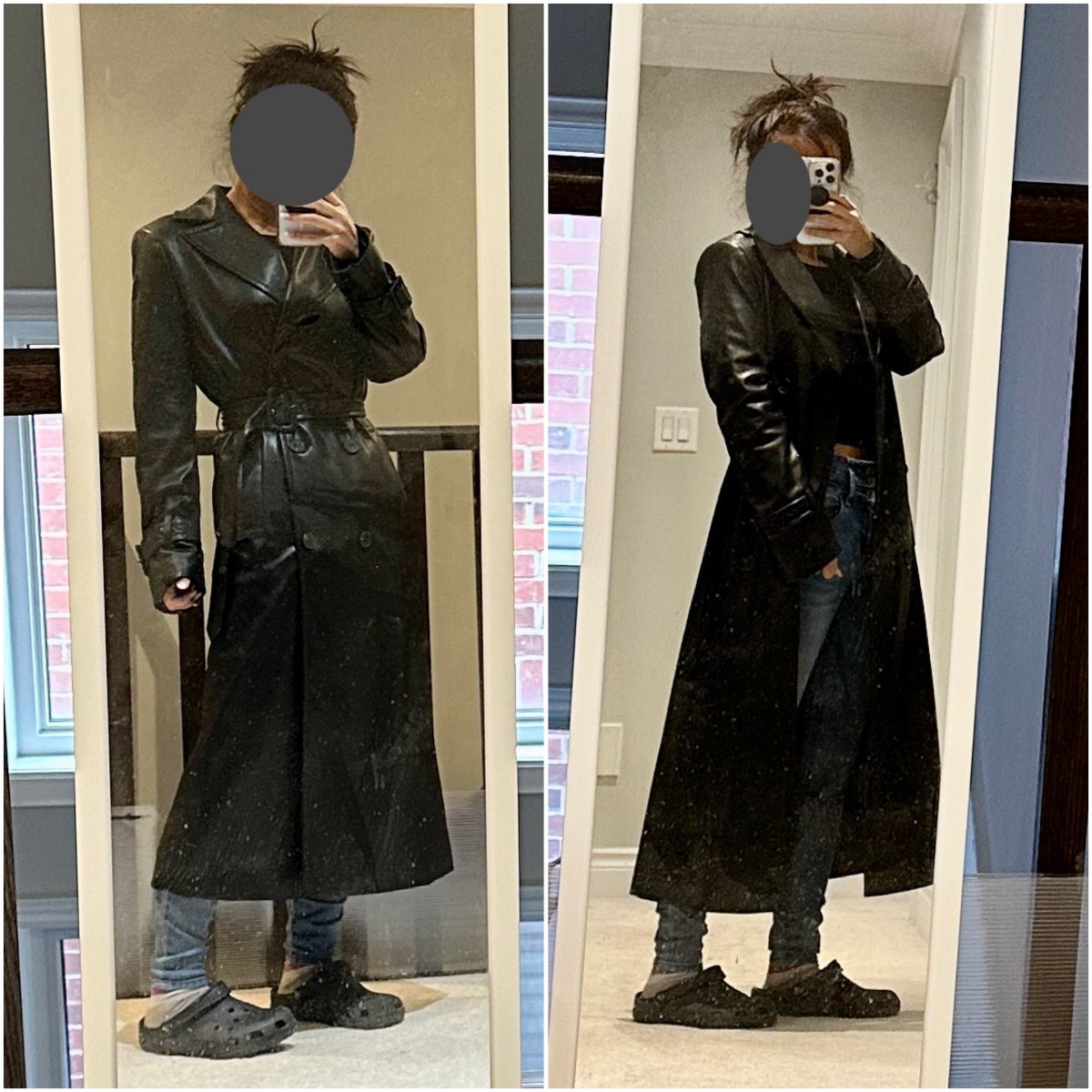
one of my post-holiday sale purchases: a faux leather trench coat. i first ordered it is XS, bit seemed a little bug so i exchanged for this XXS...still feels a little big in the shoulders and the sleeves are def too long. undecided if i am going to keep it. The Kid says its too Matrix-y and Mr. says its giving Inspector Gadget vibes ??????

  • From the album:

    ms.sss OOTDs

    · 138 images

    Account

    Navigation

    Search

    Search

    Configure browser push notifications

    Chrome (Android)
    1. Tap the lock icon next to the address bar.
    2. Tap Permissions → Notifications.
    3. Adjust your preference.
    Chrome (Desktop)
    1. Click the padlock icon in the address bar.
    2. Select Site settings.
    3. Find Notifications and adjust your preference.