




Skip to content
View in the app

A better way to browse. Learn more.

BariatricPal

A full-screen app on your home screen with push notifications, badges and more.

To install this app on iOS and iPadOS
  1. Tap the Share icon in Safari
  2. Scroll the menu and tap Add to Home Screen.
  3. Tap Add in the top-right corner.
To install this app on Android
  1. Tap the 3-dot menu (⋮) in the top-right corner of the browser.
  2. Tap Add to Home screen or Install app.
  3. Confirm by tapping Install.

In the beginning.....
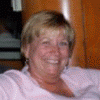
4-27-08 Here I am starting this exciting journey. I have so much to learn, but I'm ready and willing. It's the fact that when I get my band I will be healthy again. I thank God that He has given surgeons the widsom of how to do this surgery to help so many people. I pray that I will have the will power to use this new tool to help me in every way. I look forward to the day that the yo yo stops going up and down. WOO HOO!!!!

1 Comment

Recommended Comments

Tulosmom

LAP-BAND Patients

4-27-08 Here I am starting this exciting journey. I have so much to learn, but I'm ready and willing. It's the fact that when I get my band I will be healthy again. I thank God that He has given surgeons the widsom of how to do this surgery to help so many people. I pray that I will have the will power to use this new tool to help me in every way. I look forward to the day that the yo yo stops going up and down. WOO HOO!!!!

Guest
Add a comment...

Account

Navigation

Search

Search

Configure browser push notifications

Chrome (Android)
  1. Tap the lock icon next to the address bar.
  2. Tap Permissions → Notifications.
  3. Adjust your preference.
Chrome (Desktop)
  1. Click the padlock icon in the address bar.
  2. Select Site settings.
  3. Find Notifications and adjust your preference.