Skip to content
View in the app

A better way to browse. Learn more.

BariatricPal

A full-screen app on your home screen with push notifications, badges and more.

To install this app on iOS and iPadOS
  1. Tap the Share icon in Safari
  2. Scroll the menu and tap Add to Home Screen.
  3. Tap Add in the top-right corner.
To install this app on Android
  1. Tap the 3-dot menu (⋮) in the top-right corner of the browser.
  2. Tap Add to Home screen or Install app.
  3. Confirm by tapping Install.
  • Appearance

I saw THIS today...

blogs/blog-0350635001380298867.jpg

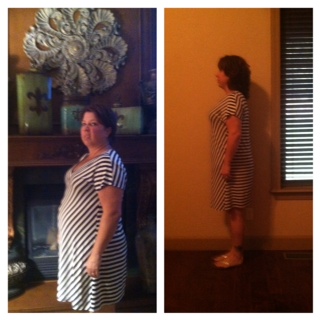
I put on the dress that I have on in my before picture...I asked my 7 yr old to take a picture of me today! Just 2 months out! He said, "mom, you don't like taking pictures!" So I told him to just take it! I was so surprised when I did the side by side photo, what did we ever do without these!!! Holy crap...I SAW the difference!


Is it possible to look at yourself everyday and NOT see the changes? In my case YES!!! I'm still working on my mind seeing me as a lighter version of myself...and sometimes I just don't see it...but today I did! And for the first time in a long time I like what I am seeing!


Happy Friday, and thanks for listening to my rant!!!! :D

3 Comments

Recommended Comments

Miss Mac

Gastric Sleeve Patients

I'll have what she's having!

Decembersleever

Gastric Sleeve Patients

Great job! Keep going and don't let up. You'll get there

Guest
Add a comment...

Account

Navigation

Search

Search

Configure browser push notifications

Chrome (Android)
  1. Tap the lock icon next to the address bar.
  2. Tap Permissions → Notifications.
  3. Adjust your preference.
Chrome (Desktop)
  1. Click the padlock icon in the address bar.
  2. Select Site settings.
  3. Find Notifications and adjust your preference.