Skip to content
View in the app

A better way to browse. Learn more.

BariatricPal

A full-screen app on your home screen with push notifications, badges and more.

To install this app on iOS and iPadOS
  1. Tap the Share icon in Safari
  2. Scroll the menu and tap Add to Home Screen.
  3. Tap Add in the top-right corner.
To install this app on Android
  1. Tap the 3-dot menu (⋮) in the top-right corner of the browser.
  2. Tap Add to Home screen or Install app.
  3. Confirm by tapping Install.
  • Appearance

Today is the day!

blogs/blog-0410796001370957044.jpgI am in San Antonio for my long awaited day of surgery. Yesterday was spent meeting with my doctor, my advocate, Count Dracula and shopping.


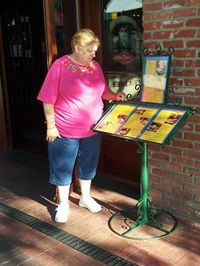
My sister is with me and we walked all through the Mexican Market. I bought me two things for after the surgery but I was scared to buy anything too small for fear I would never get there.


We stopped at the best Mexican food place and starred at the menu as you can see in the picture. I said good-bye for now.


This morning I am ready for the next chapter in my life. I will officially be a cheap date.


My surgery is scheduled for 1:30 this afternoon. The doctor says I will NOT have any tubes (Ng tube or catheter) when I come out. My job will be to sip and walk. That makes me very happy.


I love you all and will check in soon.


Judy

2 Comments

Recommended Comments

2Big2Skate

Gastric Sleeve Patients

I'm so excited for you! Relax and trust in the skill in of the surgeon and team that you've chosen. Check back in soon and let us know how its going!

Kay__S

Gastric Sleeve Patients

You said goodbye to mexican food. I love that you did that! I am nearby in Austin; so I know that eating mexican food is a spiritual experience. But what you've done is so much more amazing!

Guest
Add a comment...

Account

Navigation

Search

Search

Configure browser push notifications

Chrome (Android)
  1. Tap the lock icon next to the address bar.
  2. Tap Permissions → Notifications.
  3. Adjust your preference.
Chrome (Desktop)
  1. Click the padlock icon in the address bar.
  2. Select Site settings.
  3. Find Notifications and adjust your preference.