Skip to content
View in the app

A better way to browse. Learn more.

BariatricPal

A full-screen app on your home screen with push notifications, badges and more.

To install this app on iOS and iPadOS
  1. Tap the Share icon in Safari
  2. Scroll the menu and tap Add to Home Screen.
  3. Tap Add in the top-right corner.
To install this app on Android
  1. Tap the 3-dot menu (⋮) in the top-right corner of the browser.
  2. Tap Add to Home screen or Install app.
  3. Confirm by tapping Install.

NSV Continued

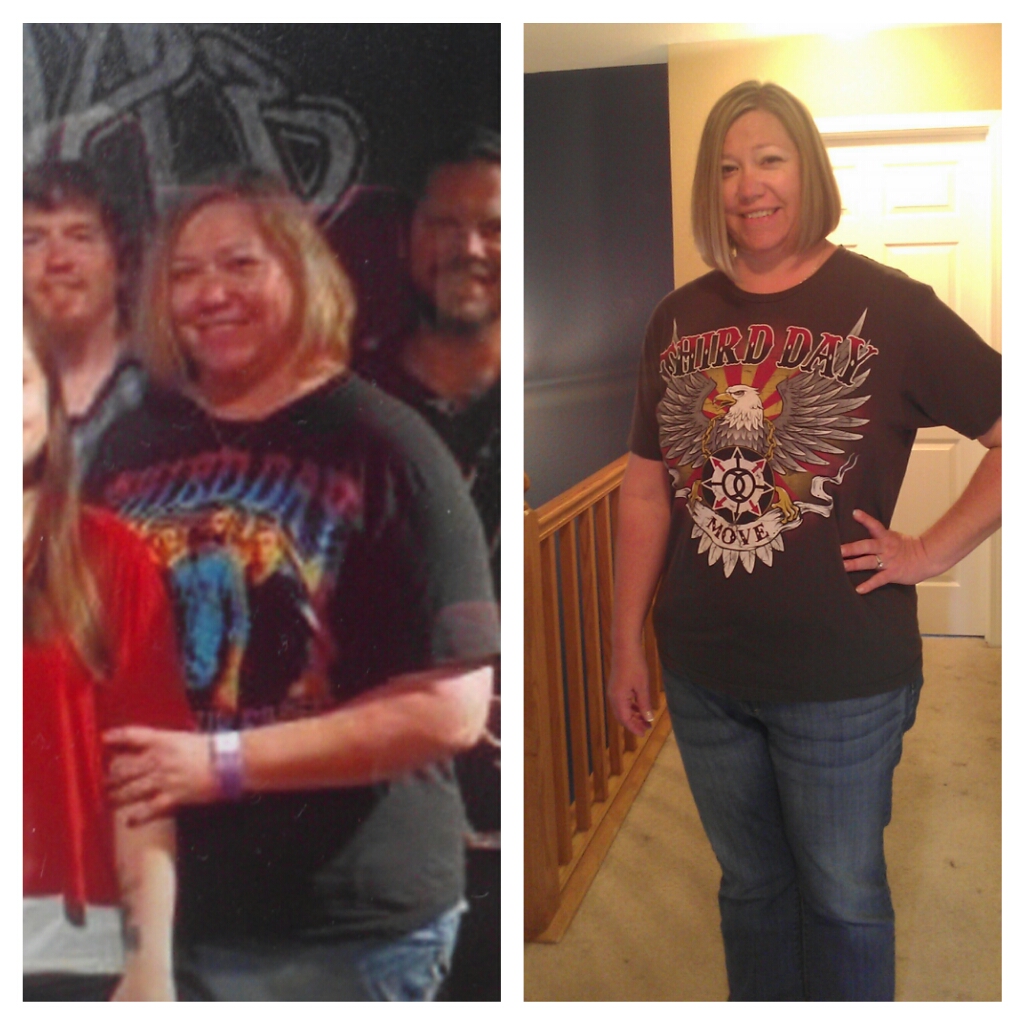
blogs/blog-0399421001364664054.jpgLooked back over my blogs and I realized I blogged about the day we went to the Third Day Concert (almost a year ago) and the shirt I wanted to wear didn't fit. Fast forward to today and I am wearing that shirt..the one that didn't fit!!!


Hopefully the picture will attach. The pic on the left was last year and it's a picture of the Concert picture...but you get the idea. The one on the right is today. Not a before and after, but definitely a before and during!!

3 Comments

Recommended Comments

kristikay

LAP-BAND Patients

Wow what a difference. I bet you feel as good as you look!

SmilingEyes

Gastric Sleeve Patients

Fantastic! Keep up the good work.. i bet it feels great!

Guest
Add a comment...

Account

Navigation

Search

Search

Configure browser push notifications

Chrome (Android)
  1. Tap the lock icon next to the address bar.
  2. Tap Permissions → Notifications.
  3. Adjust your preference.
Chrome (Desktop)
  1. Click the padlock icon in the address bar.
  2. Select Site settings.
  3. Find Notifications and adjust your preference.