




Skip to content
View in the app

A better way to browse. Learn more.

BariatricPal

A full-screen app on your home screen with push notifications, badges and more.

To install this app on iOS and iPadOS
  1. Tap the Share icon in Safari
  2. Scroll the menu and tap Add to Home Screen.
  3. Tap Add in the top-right corner.
To install this app on Android
  1. Tap the 3-dot menu (⋮) in the top-right corner of the browser.
  2. Tap Add to Home screen or Install app.
  3. Confirm by tapping Install.
  • Appearance

Finally!!! Got My Surgery Date!
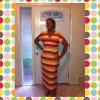
I finally got a call yesterday from my patient advocate, Rachel and I had the all clear! Dr. Reilly's office called today and we scheduled my pre-op and surgery dates!!thumbs_up.gif My pre-op is on 2/7 and the big day is 2/15!!! I am going to get all of my surgery needs taken care of this weekend. Any suggestions of items that are must haves? I am getting the Gas-X strips, chewable vitamins and foods or liquids I need for the first two weeks.

1 Comment

Recommended Comments

caligalles

LAP-BAND Patients

Congrats! Dr. Reilly is awesome and so is Rachel! Advil liqui-gels are a must. I went though my pain meds really fast. Jello, Dreyers fruit bars, chicken broth low sodium - those were my favs! Good luck and keep in touch! Leslie

Guest
Add a comment...

Account

Navigation

Search

Search

Configure browser push notifications

Chrome (Android)
  1. Tap the lock icon next to the address bar.
  2. Tap Permissions → Notifications.
  3. Adjust your preference.
Chrome (Desktop)
  1. Click the padlock icon in the address bar.
  2. Select Site settings.
  3. Find Notifications and adjust your preference.