




Skip to content
View in the app

A better way to browse. Learn more.

BariatricPal

A full-screen app on your home screen with push notifications, badges and more.

To install this app on iOS and iPadOS
  1. Tap the Share icon in Safari
  2. Scroll the menu and tap Add to Home Screen.
  3. Tap Add in the top-right corner.
To install this app on Android
  1. Tap the 3-dot menu (⋮) in the top-right corner of the browser.
  2. Tap Add to Home screen or Install app.
  3. Confirm by tapping Install.

Think "I AM a RUNNER!"
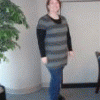
Busy day ahead, so I don't have time for much. But I wanted to check in and ask for everyone to wish me luck on my 5K tomorrow! Although I have practiced a bit more, I'm still not ready to run 3.1 miles. Ha!


But it will be fun since I'm doing it with a dear friend. I picked up my packet yesterday, so I'm ready to go!!


I have a little bit of Halloween spirit today. I'm wearing a Rangers shirt (they are going to do SO much better at home) with some little devil horns (since I'm an ANGRY Ranger). I need to go by Target tonight because I need some Halloween socks and a long sleeved Tshirt to wear to the run. It's getting COLD in the mornings!!


Have a super weekend everyone!

5 Comments

Recommended Comments

sandradee0124

LAP-BAND Patients

Good luck on your run! You will do fantastic, I know.

Winks

LAP-BAND Patients

May you run your best race ever!

finallyncontrol

LAP-BAND Patients

what is it..you can do it charlie brown..you go girl!!

marw

LAP-BAND Patients

Can't wait for your post run debriefing .. . .exciting!! Good luck!! Break a leg . .. oh that's not it, is it? ha ha . . .Uhmmmm ok, just do well!! :-)

Toothfairyy

LAP-BAND Patients

Good Luck I'm so happy for you thats one thing that I'm hoping I will be able to do one day, thanks :-)

Guest
Add a comment...

Account

Navigation

Search

Search

Configure browser push notifications

Chrome (Android)
  1. Tap the lock icon next to the address bar.
  2. Tap Permissions → Notifications.
  3. Adjust your preference.
Chrome (Desktop)
  1. Click the padlock icon in the address bar.
  2. Select Site settings.
  3. Find Notifications and adjust your preference.