




Skip to content
View in the app

A better way to browse. Learn more.

BariatricPal

A full-screen app on your home screen with push notifications, badges and more.

To install this app on iOS and iPadOS
  1. Tap the Share icon in Safari
  2. Scroll the menu and tap Add to Home Screen.
  3. Tap Add in the top-right corner.
To install this app on Android
  1. Tap the 3-dot menu (⋮) in the top-right corner of the browser.
  2. Tap Add to Home screen or Install app.
  3. Confirm by tapping Install.

Hello Everyone

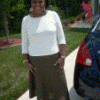
It has been a while since I posted to my blog. To this day, I have lost 100 lbs and I am down to a size 10. I never thought I would see results this fast from my lap band. I have do have lose skin, but I was told by a plastic surgeon that it is not bad. It's mostly around my abdomen area. Like I mentioned in a blog before, I have great restriction and lots of energy. I will post later to keep everyone updated on my progress.:thumbup:

3 Comments

Recommended Comments

MsMia2u

LAP-BAND Patients

It has been a while since I posted to my blog. To this day, I have lost 100 lbs and I am down to a size 10. I never thought I would see results this fast from my lap band. I have do have lose skin, but I was told by a plastic surgeon that it is not bad. It's mostly around my abdomen area. Like I mentioned in a blog before, I have great restriction and lots of energy. I will post later to keep everyone updated on my progress.:thumbup:

SanDiegoUbermom

LAP-BAND Patients

GOOD JOB!!

Size 10, oh how I want to see that size again. Currently at a 16/18 (was at a 20/22).

I know that I too will have tummy issues after having 2 c-section and the weight gain. I'll tackle that when I get to my ultimate goal.

Thanks for posting, it’s great to hear good news!

Band_Groupie

LAP-BAND Patients

Wow...you're in the Century Club! Congratulations!! -BG

Guest
Add a comment...

Account

Navigation

Search

Search

Configure browser push notifications

Chrome (Android)
  1. Tap the lock icon next to the address bar.
  2. Tap Permissions → Notifications.
  3. Adjust your preference.
Chrome (Desktop)
  1. Click the padlock icon in the address bar.
  2. Select Site settings.
  3. Find Notifications and adjust your preference.