GreenEyes604
Gastric Sleeve Patients
-
Joined
-
Last visited
-
-
-
-
-
-
-
-
 ProudGrammy reacted to a post in a topic:
19, getting sleeved on FEBRUARY 25th NEXT WEEK! Need a scale
ProudGrammy reacted to a post in a topic:
19, getting sleeved on FEBRUARY 25th NEXT WEEK! Need a scale
-
-
Good morning, We have created a group on Facebook called “VSG Mentors – Paying It Forward. We are a small group of both male and females who all met here on Bariatric Pal and had our surgeries in December 2014. We have supported each other through our journey, and have now decided to share our ups and downs with others who are just beginning their journey. Our group is a Facebook “Secret” group which means that no one other than the people in the group can see your posts, and no one can even find the group if they were to do a search. This way you are guaranteed to be complete concealed from anyone not in the group. So, if you are looking for a small group to join of caring people who have already been through what you are about to experience, please send me a private message, along with your email address, and I will send you an invitation to our secret group. Michelle Missy Jasper aka GreenEyes604
-
-
-
-
Born and raised in Cincinnati, OH... Currently living in Silver Spring, MD
-
-
-
@@bellabloom I'm going to say to you the exact same thing that my very best friend in the entire world told me when I was in an absolutely horrible relationship with my ex-husband #2. She would say to me, "Michelle, I'm not going to tell you what you SHOULD or NEED to do, but what I'm going to do is give you all the information that you need to make an intelligent decision on your own, and when you have had enough, you will do something about it, and not a minute before". Truer words have never been spoken. Everyone can give you advise on what you need to do, but NO ONE knows what you are dealing with. The only thing they know is what they have gone through, and what they have experienced, and what they did about it. I'm not saying that some situations are not pretty much the same, but how each and everyone of us deals with them is a different story. From reading all of your posts it may not be clear to you yet, but it is very clear to me that you already know what you need to do. Putting it into action will be the toughest part. But trust me when I say to you that no matter what ANYONE says to you, you will not do anything about it until you have had ENOUGH, and only you will know when that time comes. I too knew a very long time before I actually did something about it that I need to get out of that relationship. But for me walking away from the relationship would cause me to label myself as a failure, and I didn't want that. The day finally came, just as my best friend had told me, I had endured ENOUGH, and I told him he had to get out and I wanted a divorce that day! My suggestion at this point to you is to reread everything that you have posted, and then give yourself the same advise that you would give your best friend, your daughter, or anyone else that you loved and cared about. If you are honest with yourself, you already know what your decision needs to be, and the action you need to take. You just haven't reached the point yet where you have HAD ENOUGH! I pray that you come to a decision that you can live with and is good for you and your children. Just remember this... Is the situation that you are currently in, the one that you want your children to grow up in and believe and replicate, believing that it is how 2 people that love and care about each other are supposed to behave.
-
I don't smoke but I do know that my surgeon would not operate on anyone that had smoked 6 months prior to surgery. She also required a nicotine and blood test just prior to surgery. She told me that she has actually refused to do surgery on a couple of her patients the day of surgery because they tested positive. I would definitely be sure to discuss this with your surgeon. I'm sure you wouldn't want to find out that they wouldn't operate the day of your surgery. I can't even imagine what that would be like. Best of luck to you along this journey!
-
-
-
-
-
-
-
Much love and thanks to everyone for the kind words. It's been a challenge, but its definitely worth it. Believe it or not, I'm still in the "losing" stage. I'm very anxious for my body to stabilize so that I can move comfortably into the maintenance phase. You too will get there! Just remember that the race isn't give to the swift, but to those that endure to the end.
-
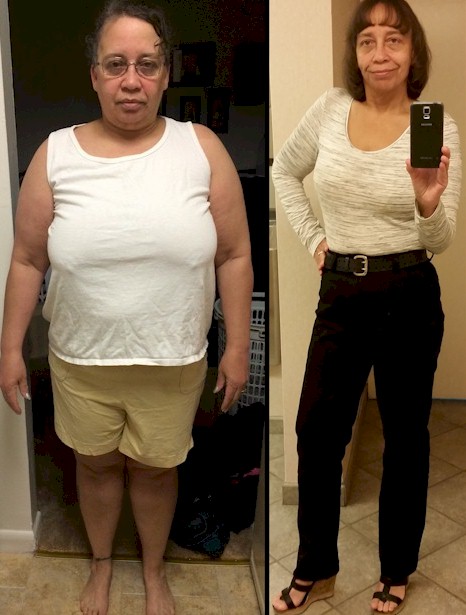
@@deedee19625 I began my journey weighing 250 exactly. As of today I weight 139. So that's a total of 111 lbs. I've actually lost a whole entire person. It's really deep when you think about it.
-
@Imblakes One of the things that you have to remember is that you are going to go through multiple stalls. I have been through probably 3-4 stalls, and during each one of those times I will go up and down 2-3 pounds for a couple of weeks. I would eventually move past the stall and begin losing again. The main things for me are to be sure to get in your recommended Protein levels everyday, and make sure that you keep your Fluid levels high. When you come upon one of your stalls, change something about your intake. My doctor told me to increase my carbs a little. This will lightly shock your system into a change and you will start losing again once you decrease your carb intake again. I wish you all the best on your journey.
-
@@nilamji I know exactly how you feel. Just remember you're going to have your ups and downs there is no doubt about that. But as long as you get back up and remember the bad moments only last for a season, you will definitely make it through.
-
@ Thank you so much, I truly appreciate the kind words.
-
I am officially 9 months into my post op journey, and if you would have told me this time last year that I would be down from a size 20 to a size 6, I would have laughed in your face. For everyone who is struggling with this decision, or is losing weight at a slow pace, keep your head up and let your new sleeve work for you. Don't over think things. If you slip up or fall down, pick yourself up, brush your shoulders off, and keep on truckin'. I will not lie and say that this journey is easy, because it is very, very, hard. But believe me, if you work with your sleeve, and let your sleeve work for you, you too will find yourself in complete awe of where you'll be 9 months out from your surgery. I wish everyone true happiness and success in their journeys, and if you are fortunate enough to find people here in the forums that will be as honest and upfront with you as some of those people that I have encountered have been with me, I promise your journey will be made just a little bit easier. Thank you @@Alex Brecher for creating a forum for all of us to share, encourage, and uplift each other along this path.

-
WOW... this is really interesting how many people are close to the same height and weight, but wear completely different sizes. Currently... Height: 5'4" Weight: 149 Pants: Size 8 on the verge of size 6 (never in a million years would I have ever believed I'd be that small again) Shirts: Medium

-
@@crussell Good morning and welcome! The most important thing to keep your energy up is to stay hydrated and get in as much Protein as you can. Dehydration is not your friend, and from personal experience it will sap every bit of energy that you have. SIP, SIP, SIP! Best wishes on your journey.
-
@@Sara51692 WOW... that's actually what a frozen banana looks like out of a Ninja? Did you add anything else to it when you blended it, or did you just throw the banana in there?
-
@@Jay05 I am 6-months post op and I didn't tell anyone, family or friends (except for my 24 year old daughter who lives with me). To me this is a very personal life decision and quite frankly I didn't care or want to hear what anyone else had to say about it. I made this decision and did this for me, not for anyone else. I had no desire to put myself on display for anyone to make absurd and stupid comments based on how THEY felt I was doing. I didn't tell anyone, and if I had to do it all over again, I still wouldn't tell anyone. But that's just my humble opinion. Some people who embark on this journey need the encouragement and validation that they are doing a good job from the outside world. I didn't need or want that.
-
I totally agree with @@wascott I am 6-months post op and I don't drink Protein shakes anymore, but that is a waste of protein because your body can't absorb that much in a 1 hour period, and the carbs are way too high for one serving.