Skip to content
View in the app

A better way to browse. Learn more.

BariatricPal

A full-screen app on your home screen with push notifications, badges and more.

To install this app on iOS and iPadOS
  1. Tap the Share icon in Safari
  2. Scroll the menu and tap Add to Home Screen.
  3. Tap Add in the top-right corner.
To install this app on Android
  1. Tap the 3-dot menu (⋮) in the top-right corner of the browser.
  2. Tap Add to Home screen or Install app.
  3. Confirm by tapping Install.

Emails

  • Replies 6
  • Views 3.1k
  • Created
  • Last Reply

Top Posters In This Topic

Most Popular Posts

  • liveaboard15
    liveaboard15

    Go to your username and on the little down arrow click it... then click on settings... in settings on the right you will see OTHER SETTINGS and below that says NOTIFICATION SETTINGS. Click on that and

Posted Images
Featured Replies

Unsubscribe?

Go to your username and on the little down arrow click it... then click on settings... in settings on the right you will see OTHER SETTINGS and below that says NOTIFICATION SETTINGS. Click on that and then you can edit your email settings.

aw.png

  • Author

Go to your username and on the little down arrow click it... then click on settings... in settings on the right you will see OTHER SETTINGS and below that says NOTIFICATION SETTINGS. Click on that and then you can edit your email settings.
aw.png.e3a9cf51b33ae34000b856bb2d6f748c.png

It's not letting me click on my user name.

Sent from my SM-S908U1 using BariatricPal mobile app

17 hours ago, lroever said:

It's not letting me click on my user name.

Sent from my SM-S908U1 using BariatricPal mobile app

probably because you are using a mobile app... I am using a desktop.

On 9/3/2022 at 5:53 PM, lroever said:

How can I stop getting emails sent? My email is blowing up with email daily and I'd like to not get them anymore.

Sent from my SM-S908U1 using BariatricPal mobile app

If you’re using a mobile web page:

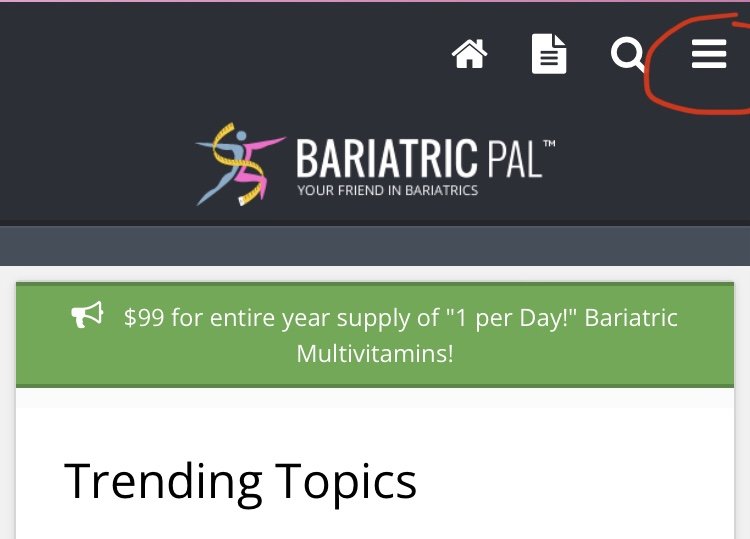
Open menu

A0AC095E-0FEB-4F6A-977A-DEBAE55181C6.jpeg

choose account

709B05CC-4AB6-44A4-B246-9FCD6F80B0D5.jpeg

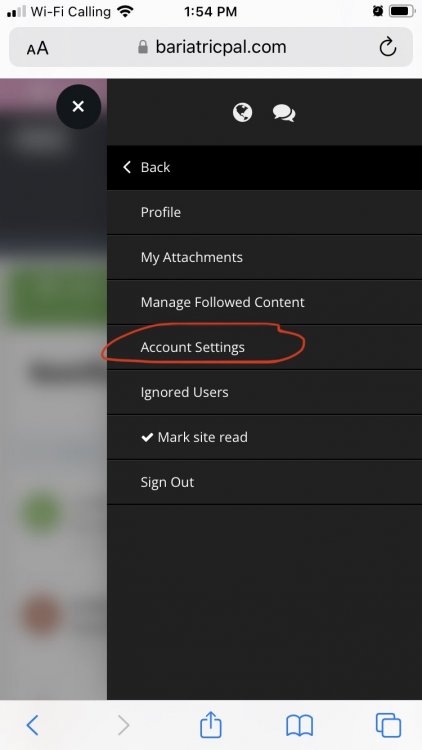
choose account settings

9DB396F1-7995-4357-93A4-22B51A2DBA33.jpeg

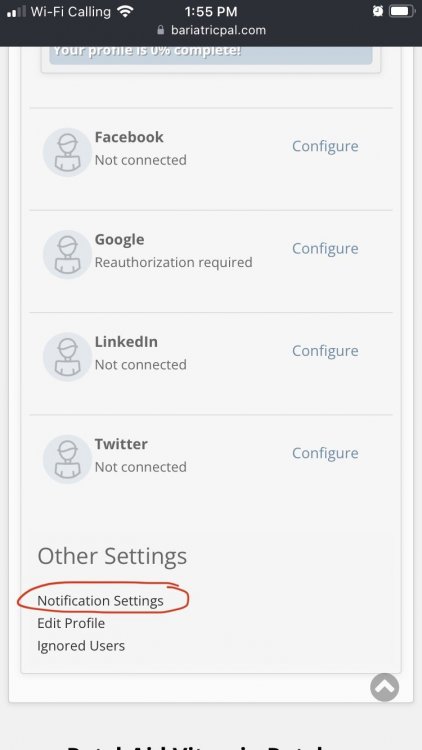
scroll down to other settings

686E9129-98FE-46FE-9F0C-74889E99332D.jpeg

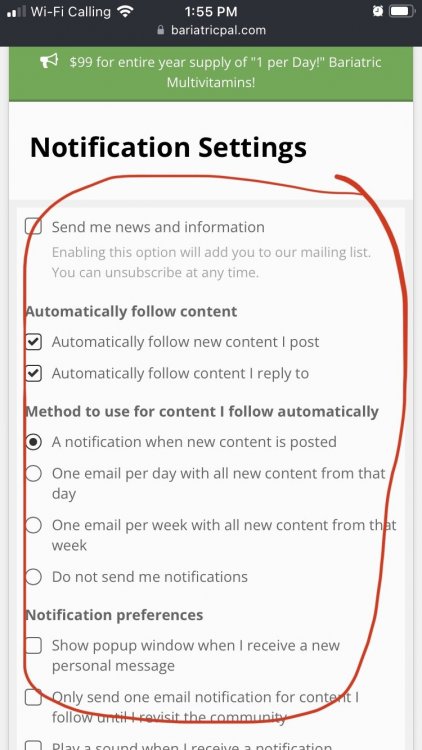
Unselect everything don’t want

AC609959-EB13-4F7D-81EF-F56A7B5C1F8C.jpeg

Hope it helps!

Edited by GreenTealael

Join the conversation

You can post now and register later. If you have an account, sign in now to post with your account.

Guest
Reply to this topic...

Trending Products

PatchAid Vitamin Patches

Account

Navigation

Search

Search

Configure browser push notifications

Chrome (Android)
  1. Tap the lock icon next to the address bar.
  2. Tap Permissions → Notifications.
  3. Adjust your preference.
Chrome (Desktop)
  1. Click the padlock icon in the address bar.
  2. Select Site settings.
  3. Find Notifications and adjust your preference.