Skip to content
View in the app

A better way to browse. Learn more.

BariatricPal

A full-screen app on your home screen with push notifications, badges and more.

To install this app on iOS and iPadOS
  1. Tap the Share icon in Safari
  2. Scroll the menu and tap Add to Home Screen.
  3. Tap Add in the top-right corner.
To install this app on Android
  1. Tap the 3-dot menu (⋮) in the top-right corner of the browser.
  2. Tap Add to Home screen or Install app.
  3. Confirm by tapping Install.

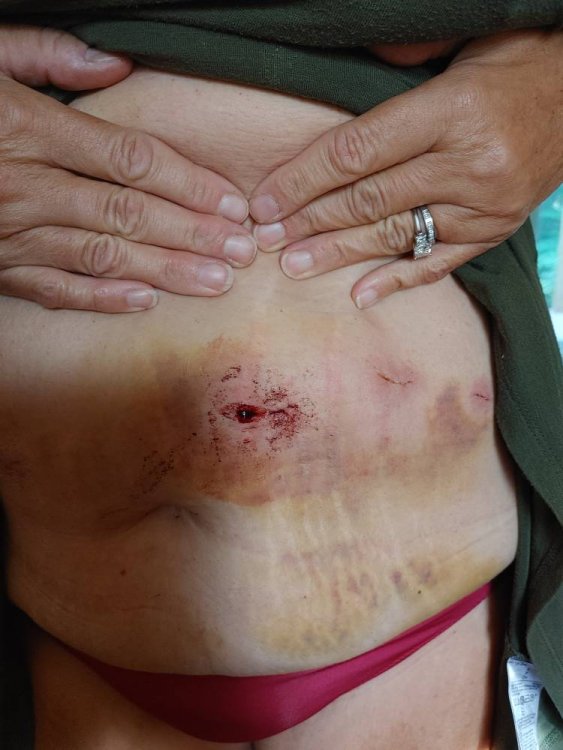
Burst incision

Sleeve Redo. Don't wear a 35 pound backpack when you have surgery. The incision can burst0823211715.jpg
Sent from my LM-G900 using BariatricPal mobile app

  • Replies 6
  • Views 1.4k
  • Created
  • Last Reply

Top Posters In This Topic

Posted Images

Featured Replies

OMG ow!! Hope you can get to your ER or doctor ASAP for that. Looks painful!

  • Author

Hi dear, waiting on his response right now !! Hopefully just steri-strips and a dry dressing and my husband can do that for me ..still hurts, ouch . My surgery was Aug 18

Oh no! That looks so painful! Hopefully they can fix you back up quickly.

Oh gracious. Didn’t they tell you not to lift anything over 10lbs for the first week or two, then increase to 20lbs for the next week or two after that.

Hope you didn’t do any internal damage to those stitches & staples holding your tummy together as well.

  • Author

I knew the ins and outs of the procedure as I have done it before. I just thought I was Superwoman and could handle a backpack instead of a suitcase , wow was I wrong.. they called me back last night and said to keep gauze on it do not manipulate the area and wear a compression garment on it like a binder. Heating pad and tylenol.So far,so good today. ???

Very glad to hear that you’re feeling better. Please hang up the cape (smile) for a couple of weeks. Send all calls and emergencies to the red phone.

Join the conversation

You can post now and register later. If you have an account, sign in now to post with your account.

Guest
Reply to this topic...

Trending Products

PatchAid Vitamin Patches

Account

Navigation

Search

Search

Configure browser push notifications

Chrome (Android)
  1. Tap the lock icon next to the address bar.
  2. Tap Permissions → Notifications.
  3. Adjust your preference.
Chrome (Desktop)
  1. Click the padlock icon in the address bar.
  2. Select Site settings.
  3. Find Notifications and adjust your preference.