Skip to content
View in the app

A better way to browse. Learn more.

BariatricPal

A full-screen app on your home screen with push notifications, badges and more.

To install this app on iOS and iPadOS
  1. Tap the Share icon in Safari
  2. Scroll the menu and tap Add to Home Screen.
  3. Tap Add in the top-right corner.
To install this app on Android
  1. Tap the 3-dot menu (⋮) in the top-right corner of the browser.
  2. Tap Add to Home screen or Install app.
  3. Confirm by tapping Install.

Pompeii Surgical

  • Popular Post

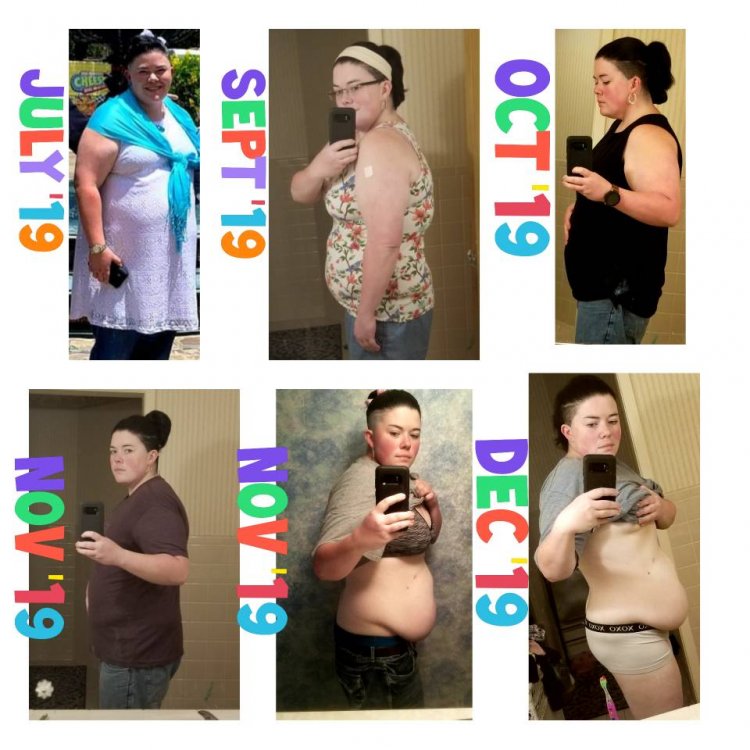
For anybody wanting to know I had my gastric bypass done in Tijuana Mexico by Pompeii Surgical. My surgeon was Dr.Q and I have has no problems since. I've lost 51lbs since surgery on October 16th 2019.

Their process was easy by applying for it , then getting approved to have a weightloss procedure , to applying for financing . And it was a piece of cake. I have pictures attached of my progress and my videos can be found on Youtibe under Deadspacegrave.

Thanks. inCollage_20191209_224132793.jpeg
Sent from my SM-G950U using BariatricPal mobile app

  • Replies 6
  • Views 9k
  • Created
  • Last Reply

Top Posters In This Topic

Posted Images

Featured Replies

Yeah I'm looking into them myself. I'm kinda nervous about traveling that far from home

Sent from my SM-G970U using BariatricPal mobile app

I just came back from my VGS, honestly the whole process was simple, just pack light if you choose too
Did you have a passport before you went out did you apply for one? How long did it take for you to schedule your surgery

Sent from my SM-G970U using BariatricPal mobile app

  • 11 months later...

Join the conversation

You can post now and register later. If you have an account, sign in now to post with your account.

Guest
Reply to this topic...

Trending Products

PatchAid Vitamin Patches

Account

Navigation

Search

Search

Configure browser push notifications

Chrome (Android)
  1. Tap the lock icon next to the address bar.
  2. Tap Permissions → Notifications.
  3. Adjust your preference.
Chrome (Desktop)
  1. Click the padlock icon in the address bar.
  2. Select Site settings.
  3. Find Notifications and adjust your preference.