Skip to content
View in the app

A better way to browse. Learn more.

BariatricPal

A full-screen app on your home screen with push notifications, badges and more.

To install this app on iOS and iPadOS
  1. Tap the Share icon in Safari
  2. Scroll the menu and tap Add to Home Screen.
  3. Tap Add in the top-right corner.
To install this app on Android
  1. Tap the 3-dot menu (⋮) in the top-right corner of the browser.
  2. Tap Add to Home screen or Install app.
  3. Confirm by tapping Install.

Globes

  • Replies 7
  • Views 1k
  • Created
  • Last Reply

Top Posters In This Topic

Most Popular Posts

  • momof3_angels
    momof3_angels

    Don't know why but it is changing the words to links you can click on. Hate it! Sent from my SM-G955U using BariatricPal mobile app

  • It’s because the font or symbol the posting person is using on their phone or computer is not translating to your phone or computer.

  • Orchids&Dragons
    Orchids&Dragons

    Can you take a screenshot? I'm not sure what you mean.

Posted Images
Featured Replies

Can you take a screenshot? I'm not sure what you mean.

Don't know why but it is changing the words to links you can click on. Hate it!

Sent from my SM-G955U using BariatricPal mobile app

It’s because the font or symbol the posting person is using on their phone or computer is not translating to your phone or computer.

  • Author

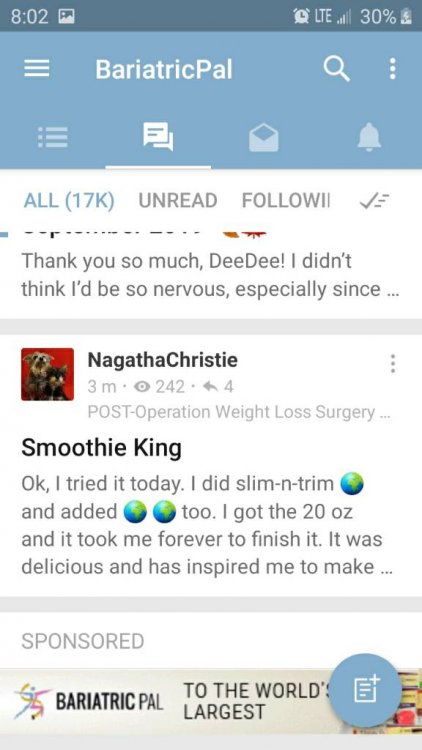
Can anyone tell me why when I read these posts these little globes are substituted for words?
Sent from my SM-J337P using BariatricPal mobile app

I'm going to try

Sent from my SM-J337P using BariatricPal mobile app

  • Author
It looks like this
Screenshot_20190916-200219.thumb.jpeg.50ae6c256a0f9561b0189ef57553ec54.jpeg

Sent from my SM-J337P using BariatricPal mobile app


Well since I said it they might have corrected the problem not seeing them anymore lol

Sent from my SM-J337P using BariatricPal mobile app

It is called hypertext. It is a word or graphics (i.e.globes) containing a link to website. In this case a link to bariatricpal store.

Join the conversation

You can post now and register later. If you have an account, sign in now to post with your account.

Guest
Reply to this topic...

Trending Products

PatchAid Vitamin Patches

Account

Navigation

Search

Search

Configure browser push notifications

Chrome (Android)
  1. Tap the lock icon next to the address bar.
  2. Tap Permissions → Notifications.
  3. Adjust your preference.
Chrome (Desktop)
  1. Click the padlock icon in the address bar.
  2. Select Site settings.
  3. Find Notifications and adjust your preference.